If you think you have a ransomware attack, what to do first is simple: disconnect the affected computers from the network, leave them powered on, and call your IT provider. Then protect your backups, call your cyber insurer, and report the attack. Those steps in the first hour do more to limit the damage than anything that happens later.
This guide is a calm, ordered checklist for owners and office managers of small businesses. It is based on the Canadian Centre for Cyber Security’s ransomware playbook and CISA’s #StopRansomware Guide. Print it now, before you need it.
Key takeaways
- Isolate first. Unplug network cables and turn off Wi-Fi on affected devices, but do not power them off or wipe them.
- Assume the attacker can still see your email and network. Use a phone or a device that isn’t connected to your network to coordinate.
- Call your IT provider and your cyber insurer right away. Check your policy for notice rules and approved responders.
- Disconnect your backups so they can’t be encrypted too.
- Don’t contact the attackers or pay anything before talking to police and your advisers.
- Report to local police, the RCMP’s national reporting system and the Cyber Centre. If personal information may be involved, assess whether you must report to Alberta’s privacy commissioner.
How do you know it’s ransomware?
Ransomware is malicious software that locks your computers or scrambles (encrypts) your files until you pay. The Cyber Centre notes that it has also grown to include data theft and extortion, where criminals copy your data and threaten to publish it.
Common signs that something is wrong:
- A message on the screen or lock screen saying your files are encrypted or your device is locked until a ransom is paid.
- Files that suddenly won’t open, have strange new names or extensions, or appear in folders as text files with “how to recover” instructions.
- Several people reporting the same problem with shared drives at the same time.
- Alerts from your antivirus or security software.
If you see any of these, treat it as real until your IT provider says otherwise.
Ransomware attack timeline: who does what
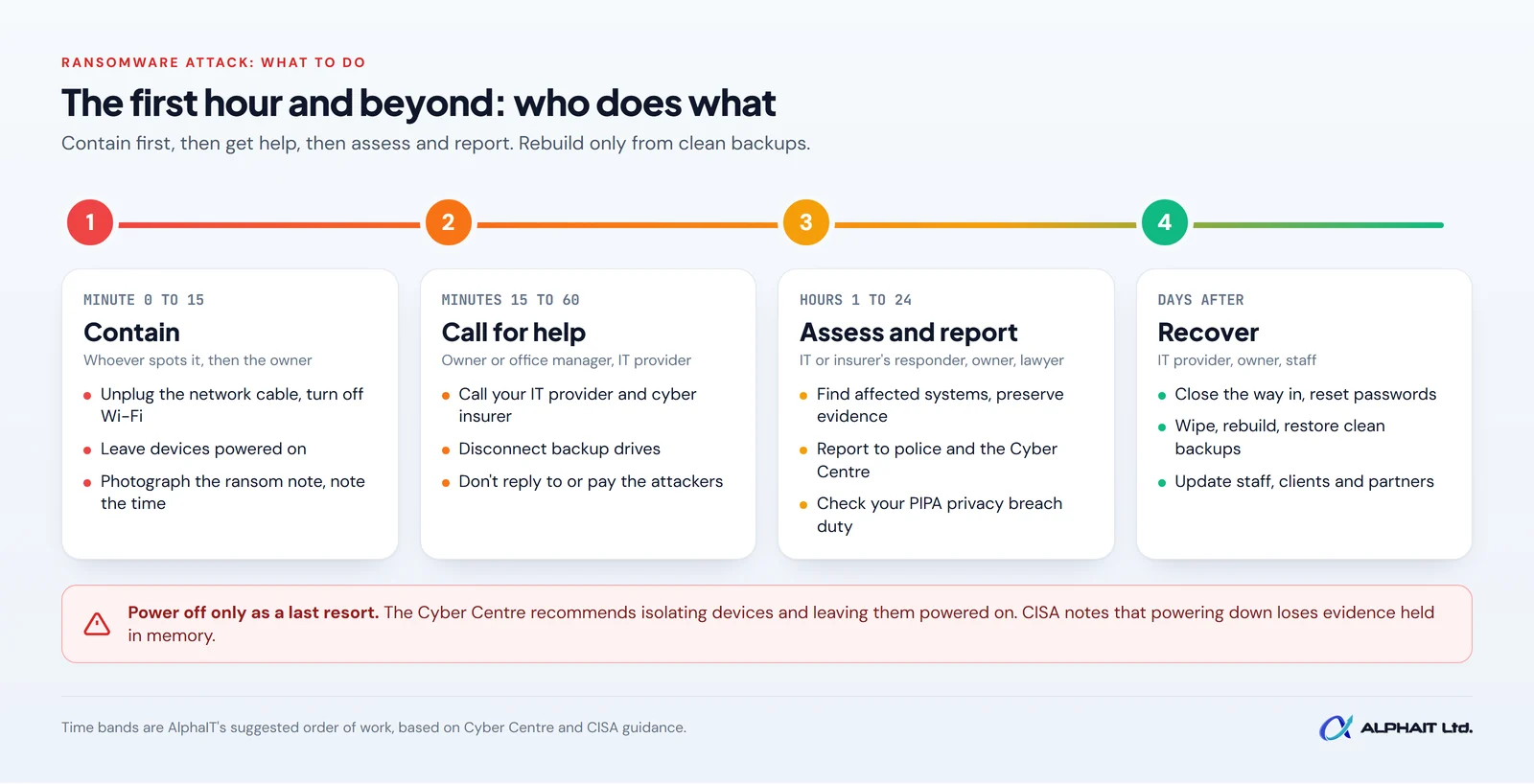
| When | What happens | Who does it |
|---|---|---|
| Minute 0 to 15 | Isolate affected devices from the network (cable out, Wi-Fi off). Leave them powered on. Tell staff to stop using the network. Write down what you saw and when. | Whoever spots it, then the owner or office manager |
| Minutes 15 to 60 | Call your IT provider and your cyber insurer. Disconnect backups. Switch to phones or a clean device for communication. Don’t contact the attackers. | Owner or office manager, IT provider |
| Hours 1 to 24 | Find out which systems and data are affected. Preserve evidence. Disable remote access. Report to police, the RCMP system and the Cyber Centre. Start a privacy breach assessment if personal information is involved. | IT provider or insurer’s responder, owner, legal adviser |
| Days after | Close the way they got in. Reset passwords. Wipe and rebuild affected devices. Restore from clean backups. Update staff, clients and partners. Review what to improve. | IT provider, owner, insurer, staff |
Step 1: Isolate affected devices, but don’t turn them off
The first goal is to stop the infection from spreading to other computers, servers and shared drives. The Cyber Centre’s playbook says to disconnect the infected systems and devices from the Internet and any internal network connection.
In practice, for each affected computer:
- Unplug the network cable from the back of the computer or the wall.
- Turn off Wi-Fi (airplane mode works on most laptops).
- Unplug any USB drives or external hard drives.
- Leave the computer powered on. Don’t restart it, wipe it, or run “clean up” tools.
Why stay powered on? The Cyber Centre’s ransomware guide says “We recommend you do not power down the device once it’s isolated.” CISA explains that powering down can destroy evidence held in the computer’s memory, and suggests it only if you can’t disconnect devices from the network any other way. That evidence can help responders work out how the attacker got in and what they took.
If many machines are affected, CISA advises taking the network offline at the switch level. Your IT provider can talk you through it.
Step 2: Call your IT provider and your cyber insurer
Within the first hour, make two calls.
Your IT provider
Tell them what you saw, when, and which devices you’ve disconnected. They will start working out how far it has spread.
Your cyber insurer
If you have cyber insurance, call the claims or incident line now, not after the fact. The Cyber Centre notes that your provider will often include the assistance of a third-party cyber security professional when ransomware strikes. Many policies set rules about how quickly you must give notice and which response firms you can use, so check your policy before you hire anyone or spend money.
Talk on a separate channel
The Cyber Centre warns that you should assume the attacker is still on your network and may be watching your communications. It recommends an alternative communication method, such as external email used on a device that isn’t connected to your network. Use mobile phones and personal accounts for coordination until your IT provider says your systems are safe.
Step 3: Protect your backups
Your backups are how you recover without paying. They are also a target. CISA notes that many ransomware variants attempt to find and subsequently delete or encrypt accessible backups.
- Unplug any backup drive that is connected to a computer or server.
- Ask your IT provider to pause backup jobs and lock down access to your cloud backup account, so encrypted files don’t overwrite good copies.
- Don’t restore anything yet. Backups need to be checked for malware before they go back onto clean systems.
One caution from the Cyber Centre: when you reset passwords later, make sure you are not changing any credentials that are required to restore your backup. If you haven’t proven your backups work recently, our guide on how to test backups shows how.
Step 4: Don’t contact the attackers or pay without advice
The ransom note will push you to act fast. Don’t reply, click links in it, or visit any payment site. Take a photo of the screen instead.
The Cyber Centre’s position is that “Paying the ransom will not guarantee access to your encrypted data or systems.” It says the decision is up to your organization, but advises that before you even consider paying, you contact your local police department. It lists real risks: attackers may demand more money, attack you again, or copy, leak or sell your data anyway. It also warns that paying may be unlawful under laws on terrorism, money laundering or sanctions.
Step 5: Report the attack
Reporting helps you, and it helps protect other businesses. The Cyber Centre playbook lists three places to report ransomware.
- Local police. Use your police service’s non-emergency line. The Cyber Centre says to call 911 if an incident is an imminent threat to life.
- The RCMP’s National Cybercrime and Fraud Reporting System. The RCMP’s National Cybercrime Coordination Centre (NC3) and the Canadian Anti-Fraud Centre take reports through one online reporting system at reportcyberandfraud.canada.ca, or by phone at 1-888-495-8501.
- The Canadian Centre for Cyber Security. Use the Cyber Centre’s report a cyber incident page and choose “An organization”. The Cyber Centre notes that reporting to it will not launch a criminal investigation, which is why you also contact police.
The playbook also suggests checking whether law enforcement can provide a decryption key if you’ve been hit by a known type of ransomware.
Step 6: Check whether you must report a privacy breach in Alberta
If the affected systems hold personal information about clients, patients or staff, ransomware can be a privacy breach, especially if data was copied. Under Alberta’s Personal Information Protection Act (PIPA), section 34.1, an organization must notify the Information and Privacy Commissioner “without unreasonable delay” when a reasonable person would consider there is a real risk of significant harm to an individual. The OIPC’s page has the PIPA breach notification form and explains that the Commissioner can require you to notify affected people. Talk to your lawyer or privacy officer early.
Step 7: Tell your staff what to do
Staff need clear, simple instructions, delivered by phone, text or in person rather than company email:
- Don’t turn on, log in to, or plug in any work device until told to.
- Don’t try to fix anything or open files to “check”.
- Report anything unusual, such as odd emails or pop-ups, to one named person.
- Don’t discuss the incident on social media or with clients yet. Direct questions to the owner.
The Cyber Centre says it is imperative to inform key stakeholders, clients and employees when an incident compromises your systems and data. Once you know the facts, plan who tells clients and partners, and what you will say.
The next 24 hours
Once the first hour is under control, your IT provider or the insurer’s responder leads the technical work. Your job is to make decisions and keep records. Expect these steps:
- Scope: work out which devices, systems and data are affected, and whether data may have been copied.
- Preserve evidence: responders may take images of affected machines before anything is wiped.
- Cut remote access: the Cyber Centre suggests deactivating VPNs, remote access servers and other public-facing services to contain the attack.
- Keep a log: write down every action, decision and call with times. Your insurer, police and the privacy commissioner may all ask for it.
- Decide what comes back first: list the systems the business needs most, such as accounting, scheduling or email.
Recovery: the days after
Recovery can take days or longer. The Cyber Centre’s playbook sets out the order:
- Close the door. Find and fix how the attacker got in before reconnecting anything.
- Reset credentials. Change passwords for administrator and user accounts, carefully, without locking yourself out of backups.
- Wipe and rebuild. Wipe infected devices and reinstall the operating system rather than trying to clean them.
- Check, then restore. Scan backups for malware, then restore critical systems first into a clean, isolated setup and update them fully.
- Learn from it. Review the root cause and tighten protections, such as multi-factor authentication (a second login step, like a code on your phone). Our guide to setting up MFA in Microsoft 365 is a good start.
Our backup and disaster recovery services are built around this kind of clean restore, and our cybersecurity services for Edmonton businesses focus on the monitoring and protections that help stop an attack before it spreads.
Printable first-hour ransomware response checklist
Print this and keep it somewhere you can reach without a computer, along with your IT provider’s and insurer’s phone numbers.
- Note the time and take a photo of any ransom message.
- Unplug the network cable and turn off Wi-Fi on each affected device. Leave it powered on.
- Unplug USB drives and external hard drives.
- Tell staff to stop using work devices and the network until further notice.
- Call your IT provider. Say what you saw and which devices are disconnected.
- Call your cyber insurer’s claims line. Check your policy for notice rules and approved responders.
- Disconnect backup drives and ask IT to pause backups and lock the backup account.
- Switch to mobile phones or a clean device for all communication about the incident.
- Don’t reply to the attackers, click links in the ransom note, or pay anything.
- Start a written log of every action and decision, with times.
- Plan your reports: local police, reportcyberandfraud.canada.ca, and the Cyber Centre.
- If personal information may be involved, call your lawyer or privacy officer about PIPA breach reporting.
Frequently asked questions
Should I turn off a computer that has ransomware?
No. Disconnect it from the network and leave it on. Both the Cyber Centre and CISA treat powering down as a last resort.
Should a small business pay the ransom?
The Cyber Centre says the decision is yours, but paying doesn’t guarantee your data back and may be unlawful. Talk to police, your insurer and a lawyer first.
Where do I report ransomware in Canada?
Report it to local police, the RCMP’s National Cybercrime and Fraud Reporting System, and the Canadian Centre for Cyber Security.
Do I have to tell the privacy commissioner?
Under Alberta’s PIPA, you must notify the Commissioner without unreasonable delay if there is a real risk of significant harm to individuals whose personal information was involved. Get legal advice on your specific situation.
Related guides: How to test backups, how to set up MFA in Microsoft 365, a cybersecurity checklist for Alberta clinics, PIPA breach reporting in Alberta, the cyber insurance security checklist.
Get ready before it happens
The best time to plan your ransomware response is on a quiet day. Take our free 3-minute IT check to see where your backups, logins and protections stand, or learn how our cybersecurity services can help. If you are dealing with an incident right now, call the AlphaIT team at 780-318-0149.