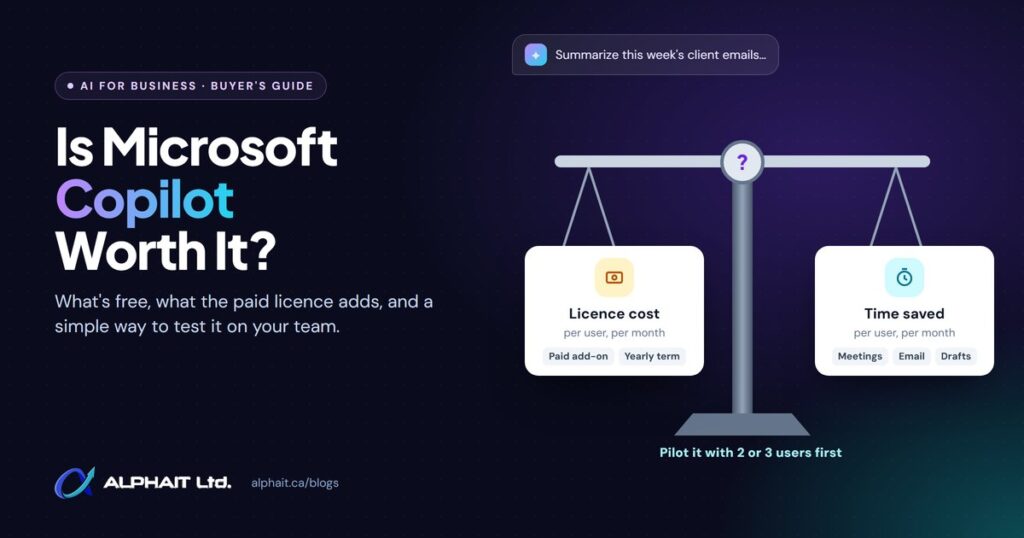
Is Microsoft Copilot worth it for a small business? For some people on your team, yes. For others, the free version you already have is enough. The paid licence pays off for staff who spend their days in email, Teams meetings and documents, as long as your files are shared sensibly. It’s a poor buy for light users, and a risky one if your SharePoint and OneDrive permissions are a mess.
This guide explains what you get for free, what the paid add-on adds, what it costs in Canada as of October 2026, and a simple way to work out whether it will pay for itself. Then we suggest a one-month pilot so you can decide from evidence instead of a sales demo.
Key takeaways
- Most Microsoft 365 business plans already include Copilot Chat at no extra cost. Try it before you buy anything.
- The paid licence adds Copilot inside Word, Excel, PowerPoint, Outlook and Teams, grounded in your emails, files, meetings and chats.
- Microsoft Canada lists the Copilot Business add-on at CAD $28.50 per user per month, paid yearly, with a first-year promotion of CAD $24.43 until December 31, 2026. Prices change, so check before you buy.
- Copilot only shows people what they already have permission to see. If files are overshared, Copilot makes that much easier to find.
- Buy licences per person, not for the whole office. A month-long pilot with 2 or 3 heavy users tells you more than any brochure.
What’s the difference between Copilot Chat and the paid Copilot licence?
Microsoft has renamed its business AI products more than once, which doesn’t help. As of October 2026, Microsoft Learn notes that Microsoft 365 Copilot is now named Microsoft Copilot, and Microsoft 365 Copilot Chat is now named Microsoft Copilot Chat. You’ll still see both old and new names on pricing pages and in the admin centre. In plain terms there are two levels.
Copilot Chat: included with most business plans
Copilot Chat is an AI assistant your staff can use with their work account. Microsoft describes it as the standalone baseline experience included with eligible Microsoft 365 licenses. It can research and summarize information from the web, draft and rewrite content, analyze files you upload and create images.
The catch is grounding, which means the information the AI draws on to answer. Copilot Chat is mainly grounded in the web. To use your own business content, you paste it in, upload a file, or work with the email or chat you have open. Microsoft notes one useful exception: Copilot Chat in Outlook can answer questions across your inbox, calendar, meetings, chats and a limited set of related content, even without a paid licence, if your Outlook setup meets the requirements.
The paid licence: Copilot working across your data and apps
The paid add-on connects Copilot to your organization’s data through Microsoft Graph, the service that links your emails, files, calendars and chats. According to Microsoft’s Copilot overview, licensed users get:
- Answers drawn automatically from their emails, files, meetings, calendars and Teams, without uploading anything.
- The full Copilot experience in Word, Excel, PowerPoint and OneNote, with priority access for faster, more consistent responses.
- Microsoft’s pre-built agents (task-focused AI assistants) such as Researcher and Analyst, plus agents that can use work data.
- Admin tools, including usage reports and SharePoint Advanced Management for finding overshared content.
In Teams, Microsoft lists features such as summarizing and transcribing meetings and capturing action items. In Outlook, it can draft emails and summarize long threads. These everyday features are where most small offices see value.
Some newer tools, such as Copilot Cowork, are billed separately by usage. Microsoft’s pricing page says some AI experiences require usage-based billing and may result in charges beyond your license fees, and admins can set spending controls in the Microsoft 365 admin centre.
Side-by-side comparison
| What you want to do | Copilot Chat (included) | Paid Copilot licence |
|---|---|---|
| Ask questions, draft text, summarize web pages | Yes | Yes |
| Work with a file you upload or paste in | Yes | Yes |
| Enterprise data protection with a work account | Yes | Yes |
| Ask about your inbox and calendar in Outlook | Yes, in supported Outlook experiences | Yes |
| Answers drawn from all your files, chats and meetings automatically | No | Yes |
| Full Copilot inside Word, Excel, PowerPoint and OneNote | Limited or standard access, depending on plan | Yes, with priority access |
| Pre-built agents that use work data | Pay-as-you-go only | Included |
| Extra cost per user | None | Yes (see pricing below) |
What does Microsoft Copilot cost in Canada?
As of October 2026, Microsoft’s Canadian Copilot pricing page lists these business options, all paid yearly, plus applicable tax:
| Option | Listed price (CAD) | Good fit for |
|---|---|---|
| Copilot Chat | Included with eligible Microsoft 365 plans | Everyone. Start here. |
| Microsoft 365 Copilot Business (add-on) | $28.50 per user/month; promotional $24.43 for the first year | Adding Copilot to selected staff on an existing Business plan |
| Microsoft 365 Business Standard with Copilot | $31.90 per user/month | Buying Microsoft 365 and Copilot together |
| Microsoft 365 Business Premium with Copilot | $43.40 per user/month | Copilot plus Premium’s added security tools |
A few details from the fine print matter. The promotional add-on price is offered between July 1, 2026, and December 31, 2026, applies to the first year only, needs an annual commitment and renews automatically. The add-on is only for existing customers on an eligible Business plan. Microsoft Learn adds that Copilot Business is meant for organizations with up to 300 users and works with Business Basic, Standard and Premium, among other plans.
Prices and promotions change often. Confirm the current price with Microsoft or your provider on the day you buy. If you’re not sure which Microsoft 365 plan you’re on, our Microsoft 365 services for Edmonton businesses page explains how we review plans and licences.
Is it safe to turn on? The permissions problem
Microsoft’s privacy commitments for business accounts are reassuring. Under enterprise data protection, prompts and responses are protected by the same contractual terms that cover your Exchange email and SharePoint files. Microsoft also states that prompts, responses and data accessed through Microsoft Graph aren’t used to train its foundation AI models.
The real risk sits inside your own tenant (your organization’s Microsoft 365 environment). Microsoft says Copilot only surfaces organizational data to which individual users have at least view permissions. That sounds safe, and it is, if permissions are right. In many small offices they aren’t. A payroll spreadsheet shared with “everyone” years ago, or a folder of HR files that kept old access links, was technically visible before. Nobody stumbled on it. With Copilot, someone can simply ask a question and the answer may draw on that file.
Microsoft’s own readiness guide notes that by default, SharePoint sets sharing settings to the most permissive option. It recommends tightening sharing settings, reviewing data access reports and restricting high-risk sites before rolling Copilot out. Before you license anyone, we suggest you:
- Find files and folders shared with “Anyone” or with the whole organization, and tighten them.
- Lock down HR, payroll, finance and client files to the people who need them.
- Remove access for former staff and old guest accounts. Our employee offboarding IT checklist covers this.
- Make sure every user signs in with multi-factor authentication.
When is Microsoft Copilot worth it?
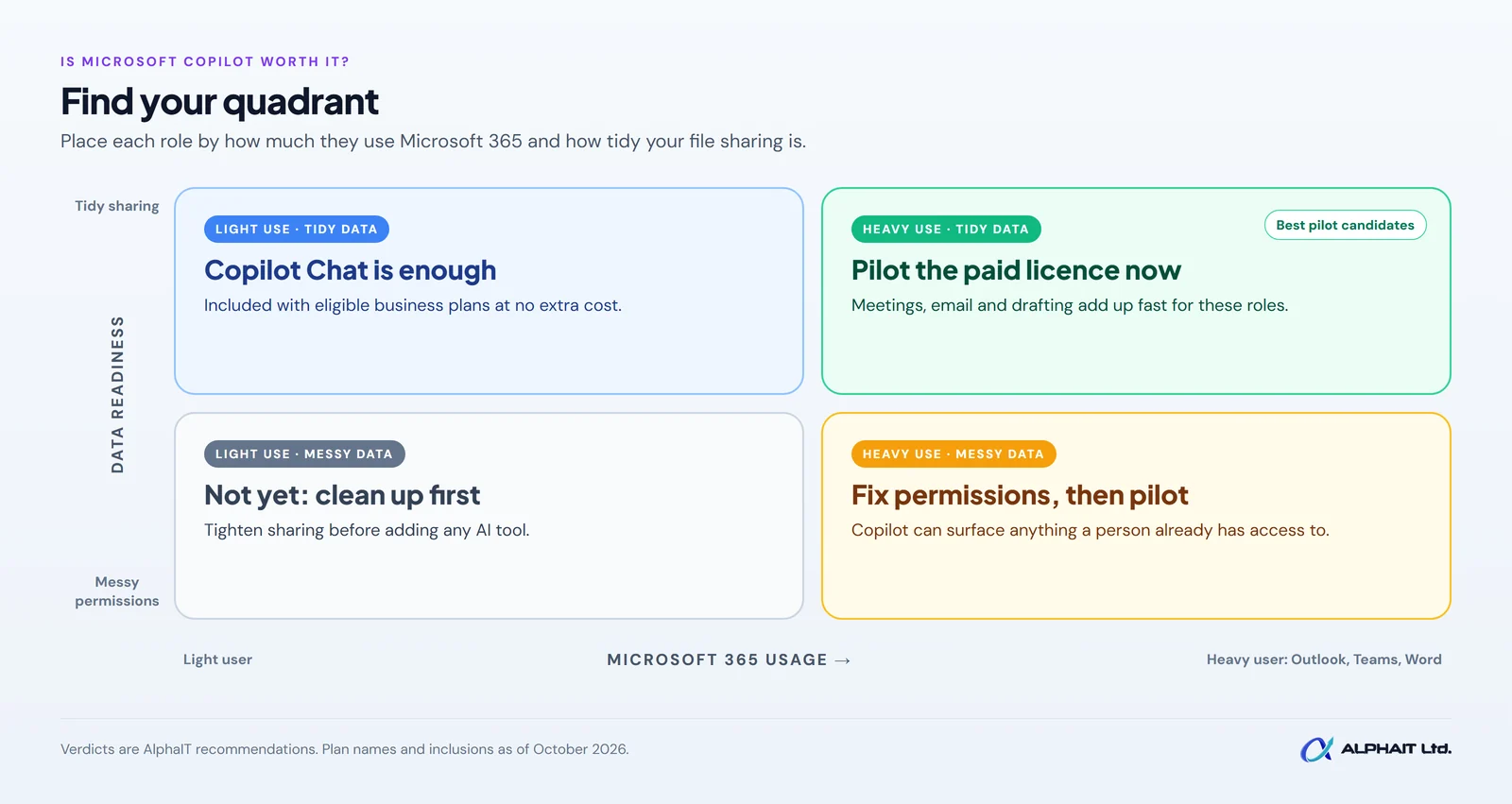
Two questions decide most cases: how much of the person’s day is spent in Microsoft 365, and how tidy your data and permissions are. Put them together and you get four likely answers.
Where the paid licence tends to pay off
- Meeting-heavy roles. Managers who spend hours a week in Teams calls can get summaries and action items instead of writing notes.
- Email-heavy roles. Office managers, coordinators and account managers who live in Outlook can summarize long threads and draft replies faster.
- Document drafting. Staff who write proposals, reports, policies or client letters in Word can start from a draft built on existing files.
- Finding things. People who often ask “where is that file?” or “what did we agree with this client?” benefit from answers that search across email, chats and files at once.
Where it usually doesn’t
- Light users. Staff who mostly use a line-of-business app, such as a practice management or point-of-sale system, and check email a few times a day. Copilot Chat covers their needs.
- Messy file permissions. Until sharing is cleaned up, more AI access to your data adds risk.
- No time to learn it. Copilot rewards people who learn to ask good questions. If no one has time to try it, the licence sits unused.
- Data outside Microsoft 365. If your important information lives in other systems, Copilot won’t see it without extra setup.
A simple worth-it calculation
You don’t need a spreadsheet model. Compare the time a person saves each month, multiplied by what an hour of their time costs you, with the monthly licence price.
Monthly value = hours saved per month x hourly cost of that employee
Here is an example with hypothetical numbers. They are made up to show the method, not results anyone has measured.
| Example input (hypothetical) | Value |
|---|---|
| Hourly cost of the employee, including benefits | $40 |
| Licence cost per month (regular listed add-on price) | $28.50 |
| Break-even time saved (licence cost divided by hourly cost) | About 43 minutes per month |
| If the person saves 2 hours a month | $80 of time for $28.50 of licence |
| If the person saves 15 minutes a month | $10 of time for $28.50 of licence |
In this example, the bar is less than an hour a month. That’s why the real question is rarely the price. It’s whether the person will use Copilot every week and whether you can measure the time saved honestly. Use your own numbers, and remember that time saved only counts if it goes into useful work.
Run a one-month pilot before you commit
Because the add-on needs an annual commitment, we recommend testing first. Microsoft’s pricing page shows a free trial option for the business plans; check the current trial terms before you start. A simple pilot looks like this:
- Clean up permissions first. Do the checks in the section above before anyone gets a licence.
- Pick 2 or 3 people. Choose your heaviest Outlook, Teams and Word users, ideally in different roles.
- Write down a baseline. Ask each person to estimate how long their regular tasks take, such as meeting notes, weekly reports or client follow-ups.
- Give them a short list of tasks to try. Meeting summaries, thread summaries, first drafts and “find what we agreed” questions. Our free AI prompt generator helps staff write clearer prompts from day one.
- Check in weekly. Five minutes: what saved time, what didn’t, and anything that surfaced which shouldn’t have.
- Decide at the end of the month. Use the formula above with real estimates. Expand to similar roles, keep the pilot users only, or stay on Copilot Chat.
| Pilot measure | How to capture it |
|---|---|
| Minutes saved per week, per person | Short weekly self-report against the baseline |
| How often Copilot was used | Copilot usage reports in the Microsoft 365 admin centre |
| Quality of output | Was the draft usable with light edits? Yes / no for each task |
| Surprises | Any answer that drew on a file the person shouldn’t have seen |
| Would they pay for it? | Ask: “If this came out of your budget, would you keep it?” |
Frequently asked questions
Is Microsoft Copilot Chat really free for business users?
It’s included at no additional cost with eligible Microsoft 365 business plans. Staff sign in with their work account to get enterprise data protection. It’s mainly grounded in the web, so it won’t search your company files on its own.
Do I have to buy Copilot for everyone in the office?
No. The add-on is licensed per user, so you can assign it only to the people who will use it. We suggest starting with a handful of licences.
Will Copilot let staff see files they shouldn’t?
Copilot only uses content each person already has permission to view. It doesn’t grant new access, but it makes existing access far easier to use. If permissions are too broad, fix them first.
Does Microsoft use our data to train its AI?
Microsoft states that prompts, responses and data accessed through Microsoft Graph aren’t used to train its foundation models, when staff use Copilot with their work accounts.
Is the promotional price permanent?
No. Microsoft lists it as a first-year promotional price for the Copilot Business add-on, available until December 31, 2026. Plan your budget on the regular price.
Related guides: How to set up MFA in Microsoft 365, the employee offboarding IT checklist, questions to ask an IT company, a free AI use policy template.
Get a straight answer for your team
If you’re weighing Copilot, start by checking the basics it depends on: secure sign-ins, sensible file sharing and the right Microsoft 365 plan. Take our free 3-minute IT check to see where you stand. Our AI solutions team in Edmonton can help you plan a pilot, tidy up permissions and decide who should get a licence. Prefer to talk it through? Call us at 780-318-0149.