Your staff are probably already using ChatGPT, Copilot or Gemini to draft emails, summarize documents and fix spreadsheets. That is usually a good thing. The risk is what gets pasted in, and what gets sent out without a second look. This free AI use policy template gives a small business a short, plain set of rules staff can follow from day one: which tools are approved, what never goes into a prompt, and how to check the results.
You don’t need a 30-page document. One or two pages that people actually read beats a long policy nobody opens. Copy the template below, adapt it to your business, and use the one-week rollout plan to put it in place.
Key takeaways
- A short written policy turns “use common sense” into clear rules your team can follow and you can enforce.
- Free personal accounts and business accounts handle your data differently. Approve business tools and say so in writing.
- Client, patient and employee personal information should never go into a tool your business doesn’t manage.
- AI output is a draft. A person checks facts, numbers and tone before anything leaves the building.
- Use the traffic-light table (Green, Amber, Red) so staff can decide in seconds what is fine, what needs approval and what is off limits.
- The template is a starting point to adapt, not legal advice.
Why does a small business need an AI policy?
Because the tools are already in use, with or without one. A policy doesn’t stop people using AI. It tells them how to use it without exposing the business.
Pasting in information you can’t take back
The biggest risk is simple: someone pastes a client email, a patient note or a payroll file into a free chatbot to “tidy it up”. The Canadian Centre for Cyber Security warns that users may unknowingly provide sensitive corporate data or personally identifiable information in their prompts, and advises people not to share private information with AI tools unless they understand what the tool does with their data.
In Alberta, privacy law still applies when AI is involved. In its guidance for small health custodians, the Office of the Information and Privacy Commissioner of Alberta notes that Alberta had no AI-specific law, but that Alberta’s privacy laws apply when AI systems process health information or personal information, including employee information under the Personal Information Protection Act (PIPA).
Free accounts and business accounts are not the same
This is the part most owners don’t know. OpenAI says that for its services for individuals, such as ChatGPT, it may use your content to train its models unless you opt out. For business products, OpenAI states that by default it does not use data from ChatGPT Enterprise, ChatGPT Business or its API platform for training.
Microsoft says prompts and responses in Microsoft Copilot and Copilot Chat, used by organizations, are covered by its enterprise data protection commitments and aren’t used to train foundation models. Google says that with Gemini in Google Workspace, your content is not human reviewed or used for generative AI model training outside your domain without permission.
The practical lesson: approve the business version of a tool, make sure staff sign in with their work account, and treat personal accounts as public. Vendor terms change, so check the current data-use page before you approve a tool. If you already pay for Microsoft 365, Copilot Chat with your work accounts may be the easiest place to start. Our Microsoft 365 services team can confirm what your licences include.
Wrong answers that sound right
AI tools can produce confident, polished text that is simply wrong. The Government of Canada’s guide for its own staff says don’t consider generated content as authoritative and review it for factual and contextual accuracy. The federal Privacy Commissioner’s principles for generative AI also ask organizations to take reasonable steps to ensure outputs are accurate, and state that accountability for decisions rests with the organization, not the automated system.
Copyright and disclosure
The same federal guide recommends checking whether outputs are identical or substantially similar to copyright-protected material, and to clearly indicate when content has been produced by generative AI. For a small business, that means a person reviews anything published and you decide in advance when customers should be told AI was involved.
What your AI use policy should cover
The Cyber Centre recommends that organizations set policies on how AI should be used and the content that is allowed to be generated, including oversight and review. The template below turns that into nine short sections. It is our suggested starting point, written for a 5 to 50 person office.
The traffic-light rule: Green, Amber, Red
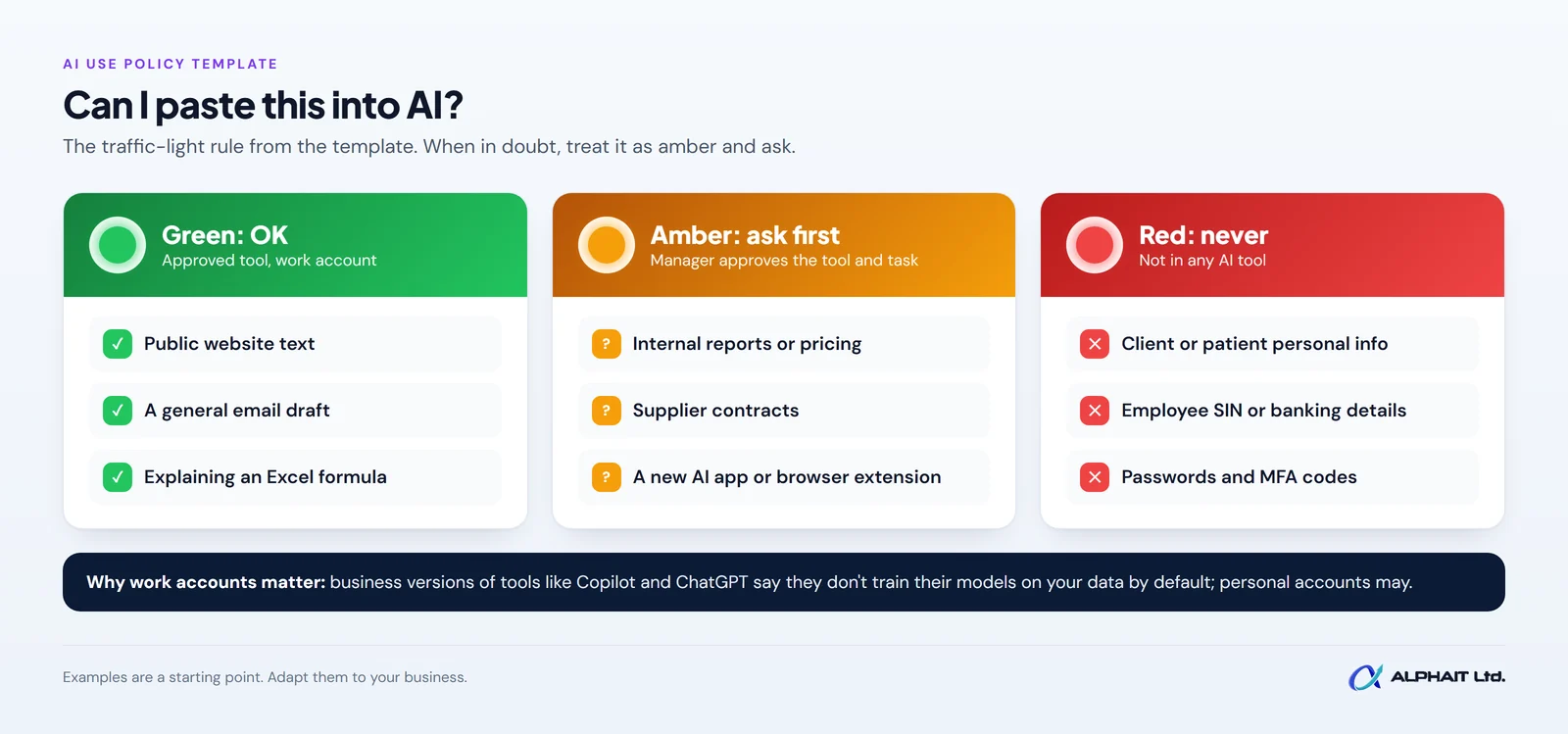
Most staff questions come down to “can I paste this in?” A traffic-light table answers that faster than any paragraph. Put it in the policy and pin it near every desk.
| Colour | What it means | Example data | Example tasks |
|---|---|---|---|
| Green: OK | Allowed in approved tools, signed in with a work account | Public information, your published website text, generic templates, made-up sample data | Drafting a general email, brainstorming blog ideas, rewording a job ad, explaining an Excel formula |
| Amber: ask first | Allowed only after your manager or policy owner approves the tool and the task | Internal documents, pricing, supplier contracts, de-identified client details | Summarizing an internal report, drafting a quote, connecting AI to shared files or email, any new AI app or browser extension |
| Red: never | Not allowed in any AI tool unless written approval and a business agreement are in place | Client, patient or employee personal information, health records, SIN or banking details, passwords and access codes | Pasting in client files, making hiring or credit decisions, uploading confidential legal or HR files, sending AI replies to clients without review |
The Privacy Commissioner’s principles suggest using anonymized or de-identified information within prompts where possible. In practice, “Client A” and “a 40-year-old patient” instead of names is a good habit, even in approved tools.
Free AI use policy template (copy and adapt)
This template is a starting point to adapt to your business, not legal advice. If you handle health information or work in a regulated profession, check it against your professional body’s rules and, if needed, your lawyer.
1. Purpose
[Business name] supports the use of AI tools to save time and improve our work. This policy explains how to use them without putting client, employee or business information at risk. It applies to all staff, contractors and volunteers, on any device used for work.
2. Approved tools
You may use only the AI tools on this list, signed in with your [Business name] work account: [for example, Microsoft Copilot Chat with your work account; ChatGPT Business]. Do not use personal AI accounts, free apps or browser extensions for work. To request a new tool, contact [policy owner].
3. What you may use AI for
- First drafts of emails, letters, social posts and job ads
- Summarizing public articles or your own notes
- Brainstorming, outlines and rewording for clarity
- Help with spreadsheets, formulas and how-to questions
4. What you must never paste in
- Names, contact details or files of clients, patients or employees
- Health, financial, SIN, banking or payroll information
- Passwords, MFA codes, access keys or system details
- Confidential contracts, legal matters or anything covered by an NDA
If in doubt, treat it as Red and ask first.
5. Checking outputs
AI output is a draft. Before you use it, check every fact, number, date, name and link against a reliable source. You are responsible for anything you send or publish, whether AI helped or not. AI must not make final decisions about people, such as hiring, discipline or credit.
6. Disclosure
Tell your manager when AI produced a substantial part of a document. [Choose: We tell clients when AI was used to produce content or advice they rely on.] Never present AI output as a quote from a real person, and check published content is not copied from someone else’s work.
7. Accounts and security
Use your work account with multi-factor authentication (MFA, a second check such as a code on your phone). Don’t share AI accounts. Don’t install AI plugins or connect AI to email, calendars or shared drives without approval. Be alert to AI-written phishing messages that look unusually polished.
8. Reporting problems
If you pasted something you shouldn’t have, or an AI tool produced something harmful or wrong that was sent out, tell [policy owner] the same day. Reporting quickly is what matters. You won’t be penalized for reporting an honest mistake.
9. Review date
This policy is owned by [name] and was last reviewed on [date]. We will review it every [6 or 12] months, or sooner when we add a tool or a vendor changes its terms. Staff sign below to confirm they have read it.
How to roll it out in a week
Here is a simple plan we suggest for a small office. It fits around normal work.
| Day | Task | Done when |
|---|---|---|
| Monday | Ask staff, without blame, which AI tools they already use and for what | You have a list of tools and common tasks |
| Tuesday | Pick approved tools; check each vendor’s current data-use page and your existing licences | Approved list written into section 2 |
| Wednesday | Fill in the template: names, approved tools, disclosure choice, review date | One or two pages, owner named |
| Thursday | Set up work accounts with MFA; remove or block unapproved apps where you can | Everyone signs in with a work account |
| Friday | Hold a 20-minute team walkthrough using the traffic-light table; collect signatures | Every staff member has signed |
Pair the policy with good prompts so staff get better results with less data. Our free AI prompt generator helps people write clear prompts without pasting in sensitive details. If you want help choosing tools, setting them up securely or training your team, see our AI solutions for Edmonton businesses.
Frequently asked questions
Is a free AI use policy template enough?
For most small offices it is a solid start, as long as you adapt it to your tools and data. Regulated businesses, such as clinics, should also check their professional body’s guidance and privacy obligations.
Should we just ban ChatGPT?
Bans tend to push use onto personal phones, where you have no control at all. We suggest approving a business tool with clear rules instead.
Is the paid business version of an AI tool safe for client data?
Business tiers offer stronger data commitments, such as no training on your data by default, but that doesn’t make every use appropriate. You still need a reason to use personal information, and you still need to protect it. Keep client data in Amber or Red unless you have reviewed the vendor’s terms.
How often should we update our AI policy?
We suggest every 6 to 12 months, and whenever you add a tool or a vendor changes how it handles data.
Related guides: How to set up MFA in Microsoft 365, an employee offboarding IT checklist, questions to ask an IT company, whether Microsoft Copilot is worth it.
Get your team using AI safely this month
Not sure which AI tools your staff already use, or whether your accounts are set up securely? Take our free 3-minute IT check to see where your gaps are. For help picking, configuring and rolling out business AI tools, visit our AI solutions page or call the AlphaIT team at 780-318-0149.