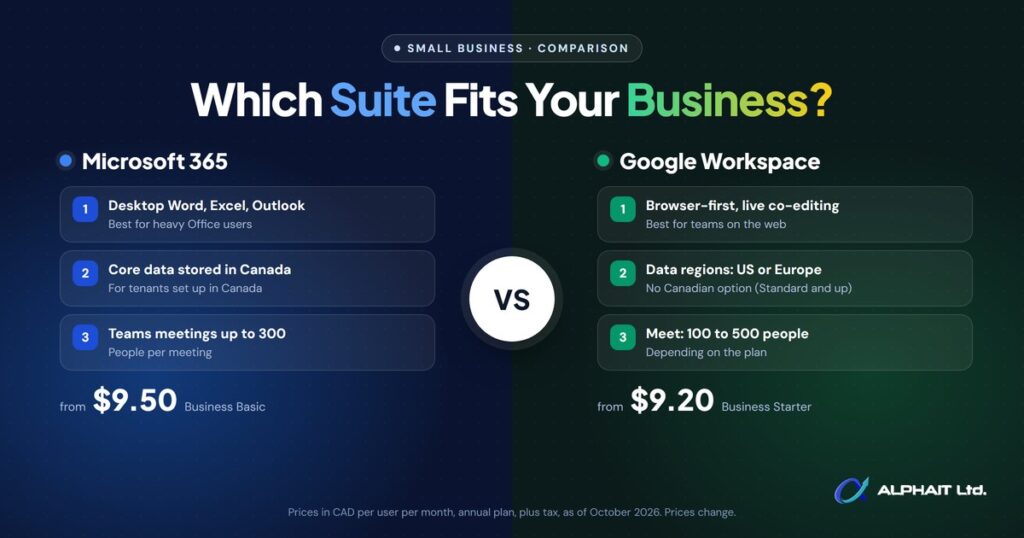
Choosing between Microsoft 365 vs Google Workspace comes down to how your team works. If your staff live in Excel and Word, or you run industry software that expects Office on the desktop, Microsoft 365 is usually the better fit. If your team works mostly in a browser, shares documents constantly and wants the simplest setup, Google Workspace is often the easier choice.
Both give you professional email on your own domain, a shared calendar, cloud file storage, video meetings and an AI assistant. The differences are in the details: desktop apps, storage, device security, AI features and where your data is kept. This guide compares them for a 5 to 50 person Canadian business, with current Canadian prices.
Key takeaways
- Microsoft 365 is the stronger pick for heavy Excel and Word users and for industry software that plugs into desktop Office.
- Google Workspace is browser-first and simple to run, which suits Chromebook teams and businesses that collaborate on documents all day.
- As of October 2026, entry plans are close in price (CAD $9.50 vs CAD $9.20 per user per month on an annual commitment), but the mid and upper tiers are bundled differently.
- Microsoft 365 Business Premium includes device management (Intune) and device protection (Defender for Business). Google’s advanced endpoint management starts at Business Plus.
- Microsoft commits to storing core data in Canada for tenants set up in Canada. Google’s data regions setting offers the United States, Europe or no preference, not Canada.
Microsoft 365 vs Google Workspace at a glance
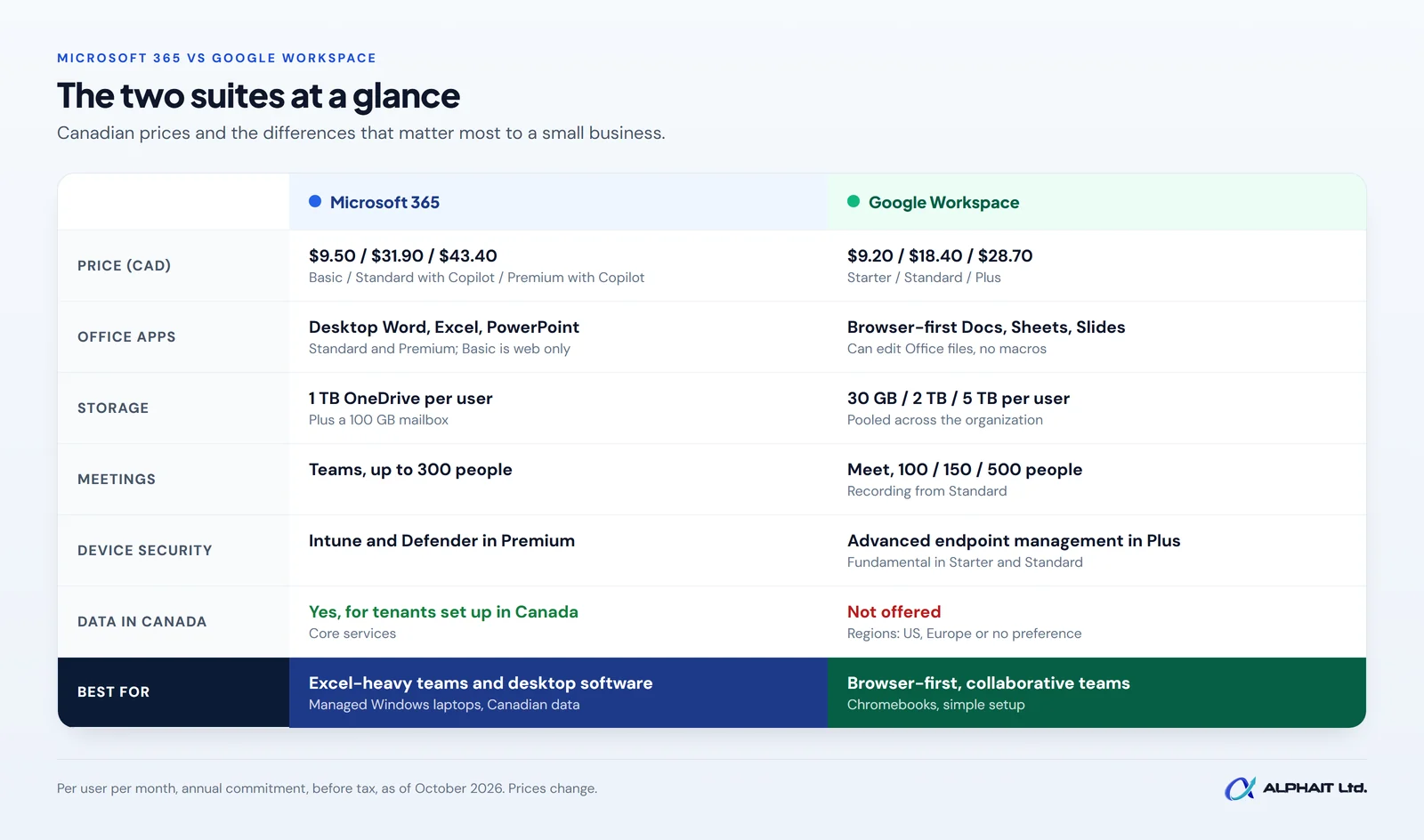
The table below compares the plans most small businesses consider. Prices are in Canadian dollars, per user per month, with an annual commitment, as listed on Microsoft’s Canadian business plans page and Google Workspace’s Canadian pricing page as of October 2026. Prices change, promotions come and go, and taxes are extra.
| Feature | Microsoft 365 | Google Workspace |
|---|---|---|
| Entry plan | Business Basic: CAD $9.50 | Business Starter: CAD $9.20 |
| Middle plan | Business Standard with Copilot: CAD $31.90 | Business Standard: CAD $18.40 |
| Top small business plan | Business Premium with Copilot: CAD $43.40 | Business Plus: CAD $28.70 |
| Desktop Office apps | Included in Standard and Premium (Basic is web and mobile only) | Not included; browser-based Docs, Sheets and Slides |
| Cloud file storage | 1 TB per user on all three plans | 30 GB (Starter), 2 TB (Standard), 5 TB (Plus) per user, pooled |
| Mailbox | 100 GB primary mailbox per user | Uses the pooled storage above |
| Video meetings | Teams, up to 300 people | Meet: 100 (Starter), 150 (Standard), 500 (Plus) participants |
| Meeting recording | Included in plans with Teams | Standard and Plus (not Starter) |
| Device management | Intune and Defender for Business in Premium | Fundamental in Starter and Standard; Advanced in Plus |
| AI assistant | Copilot Chat in all plans; full Microsoft 365 Copilot in the “with Copilot” plans | Gemini in Gmail on Starter; Gemini in Docs, Meet and more on Standard and Plus |
| Data location | Canada, for tenants set up in Canada (core services) | Data regions: United States, Europe or no preference |
What the prices include, and what they don’t
Microsoft lists every price above as “user/month, paid yearly” with an annual subscription that auto-renews, plus applicable tax. Its FAQ says monthly commitment plans are also available, but the comparison page does not list those prices, so we haven’t quoted them. Microsoft also notes that it updated its packaging and pricing on July 1, 2026, and that “some AI experiences require usage-based billing” beyond the licence fee.
Google’s page shows the prices above with the annual plan selected, and says the annual plan saves 16% compared with paying month to month. Google states that its prices are per user per month and “do not include tax”. At the time of writing, Google was also advertising 50% off the first three months. We have used the regular price, not the promotion.
Two more options worth knowing about. Microsoft 365 Apps for business (CAD $14.20) gives you desktop Office and 1 TB of storage without business email. Both vendors also sell larger plans: Microsoft’s Enterprise plans for bigger organizations, and Google Workspace Enterprise, which is priced through sales.
Desktop apps or browser-first: which suits your team?
This is the biggest practical difference. Microsoft 365 Business Standard and Premium include the full desktop versions of Word, Excel, PowerPoint, Outlook and OneNote, plus Access on PCs. Each user can install them on up to 5 PCs or Macs, 5 tablets and 5 phones. Business Basic only gives you the web and mobile versions.
Google Workspace is built to run in a browser. Docs, Sheets and Slides are excellent for real-time teamwork: several people can type in the same document at once, and there is nothing to install or update.
Google does let you edit Office files directly in Docs, Sheets and Slides, but there are limits. Macros are not supported, embedded charts in Word and PowerPoint files are converted to images, and locked or hidden cells in Excel files become viewable and editable. If your bookkeeper relies on complex spreadsheets, or your team receives heavily formatted Word documents from clients, those limits matter.
Email, calendar and file storage
Both suites give you custom business email (you@yourcompany.ca), shared calendars and room booking.
Storage works differently. Microsoft gives each user 1 TB of OneDrive storage on Business Basic, Standard and Premium, and a separate 100 GB primary mailbox. Business Premium adds archive storage of up to 1.5 TB per user, compared with 50 GB on Basic and Standard.
Google pools storage across your organization: 30 GB per user on Starter, 2 TB on Standard and 5 TB on Plus. Pooled means a heavy user can draw on space that a light user isn’t using. The catch is Starter. At 30 GB per person, a team that stores photos, drawings or large PDFs will outgrow it quickly.
Video meetings
Microsoft Teams on the Business plans can host meetings and video calls for up to 300 people, and Teams also covers team chat, channels and file sharing in one app. Google Meet allows 100 participants on Starter, 150 on Standard (with recording and noise cancellation) and 500 on Plus (with attendance tracking).
For most small businesses, either is plenty. Pick the one your clients and partners already use, so joining your meetings is effortless for them.
Security and device management
This is where the top tiers pull apart, and it matters more than most owners expect. Device management means you can enforce screen locks, push updates and wipe a lost laptop or phone remotely.
Microsoft 365 Business Premium
According to Microsoft’s plan comparison, Business Premium includes Intune for endpoint management across devices, Microsoft Defender for Business for device protection from ransomware and malware, Defender for Office 365 Plan 1 for email and collaboration threats, advanced identity and access management with Microsoft Entra ID, Microsoft Purview tools for finding and protecting sensitive data, and a Windows 11 Pro upgrade. Business Basic and Standard include multifactor authentication and spam and malware filtering, but not those device and threat protection tools.
Google Workspace Business Plus
Google’s pricing page lists “Fundamental” endpoint management on Starter and Standard and “Advanced” on Plus. Google’s mobile management comparison explains the difference. Basic management covers screen locks or passcodes, remote wipe of the work account and Android app management. Advanced adds more control over device policies, app management on iPhone as well as Android, and the ability to wipe all data from a device. Business Plus also adds Vault to retain, archive and search data.
Whichever suite you choose, turn on multifactor authentication for every account first. Our guide to setting up MFA in Microsoft 365 walks through it step by step.
AI assistants: Copilot vs Gemini
Both suites include an AI assistant, but what you get depends on the plan.
- Microsoft: Copilot Chat is included with Business Basic, Standard and Premium. Microsoft describes it as AI chat with web grounding, writing help and data analysis, and notes it “doesn’t integrate with Microsoft 365 apps or organizational content”. The full Microsoft 365 Copilot, which works inside Word, Excel, Outlook and Teams using your own files and email, is built into the “with Copilot” versions of Standard and Premium. Existing customers can add Microsoft 365 Copilot Business as an add-on, listed from CAD $28.50 per user per month.
- Google: Business Starter includes the Gemini AI assistant in Gmail and chat with Gemini. Business Standard and Plus extend Gemini into Docs, Meet and other apps, with expanded access in the Gemini app.
Before you pay for an AI tier, decide what you would actually use it for. If you want help getting better answers from these tools, try our free AI prompt generator.
Where is your data stored? Canadian data residency
If you need, or simply prefer, your data stored in Canada, this is one of the clearest differences between the two.
Microsoft’s Exchange Online data residency documentation says that if a customer provisions its tenant in Canada, Microsoft will store Exchange Online mailbox content at rest only within that geography. SharePoint and OneDrive have similar Product Terms commitments, and an admin can confirm the location under Settings, Org settings, Organization profile, Data location. Microsoft also sells an Advanced Data Residency add-on that extends these commitments to more services.
Google’s data regions setting is available on Business Standard and Business Plus (not Starter). The location options listed are the United States, the European Union or no preference. Canada is not one of the choices on that page.
If Canadian storage is a hard requirement for your industry or your clients, that difference alone may decide it.
Which should you choose?
| If your business… | Lean towards |
|---|---|
| Relies on complex Excel files, macros or heavily formatted Word documents | Microsoft 365 Business Standard or Premium |
| Runs accounting, practice management or industry software that connects to desktop Office or Outlook | Microsoft 365 |
| Needs managed Windows laptops with built-in device protection | Microsoft 365 Business Premium |
| Needs data stored in Canada | Microsoft 365, set up in Canada |
| Works mostly in a browser or on Chromebooks | Google Workspace |
| Collaborates on shared documents all day, with simple formatting | Google Workspace Business Standard |
| Needs only email, calendar and light document work on a tight budget | Either entry plan; check Google Starter’s 30 GB storage limit |
We suggest listing your three most important daily tasks and the software they depend on, then testing both suites on those tasks. Both vendors offer free trials. Our Microsoft 365 services for Edmonton businesses cover setup, security and day-to-day management if you go that way.
Can you switch later?
Yes, and Google even lists a Workspace Migrate tool for data migration in its Business Standard plan. But switching is a project, not a weekend task. Email history, shared files, calendars, permissions, shared mailboxes, phones and every app that signs in with your work account all need to move or be reconnected. Plan it, test it with a few users first, and schedule the cut-over for a quiet week.
It’s also a good moment to tidy up accounts. Our employee offboarding IT checklist helps you find old accounts that shouldn’t come along.
Whichever suite you choose, your email still needs protecting. Our email security service covers Microsoft 365, Google Workspace and Zoho Mail.
Frequently asked questions
Is Google Workspace cheaper than Microsoft 365?
At the entry level they are almost the same: CAD $9.20 for Google Business Starter and CAD $9.50 for Microsoft 365 Business Basic, per user per month on an annual commitment, as of October 2026. Higher up, Microsoft’s Standard and Premium plans cost more but bundle desktop Office and Microsoft 365 Copilot, and Premium adds device security.
Can I use Microsoft Office files in Google Workspace?
Yes. You can open and edit Word, Excel and PowerPoint files directly in Google Docs, Sheets and Slides. Some features don’t carry over, including macros, linked spreadsheets and protected cells.
Is Office 365 the same as Microsoft 365?
For small business plans, yes. Microsoft now sells its small business plans under the Microsoft 365 name: Business Basic, Standard and Premium.
Which is more secure?
Both can be very secure when they are set up properly with multifactor authentication and sensible sharing settings. Out of the box, Microsoft 365 Business Premium includes more device and threat protection than any Google Workspace Business plan. Setup matters more than the brand.
Do I need an IT provider to run either one?
Not to get started. Both are designed for small businesses to set up themselves. Many owners bring in help for security settings, device management and migrations, where mistakes are costly. Our list of questions to ask an IT company can help you choose.
Related guides: How to set up MFA in Microsoft 365, an employee offboarding IT checklist, questions to ask an IT company, whether Microsoft Copilot is worth it, what Microsoft 365 does and doesn’t back up.
Get a second opinion before you commit
Not sure which suite fits, or whether your current setup is configured safely? Take our free 3-minute IT check to see where your email, devices and accounts stand. If Microsoft 365 is the right fit, our Microsoft 365 team can set it up and look after it. Prefer to talk it through? Call AlphaIT at 780-318-0149.