Vishal Sharma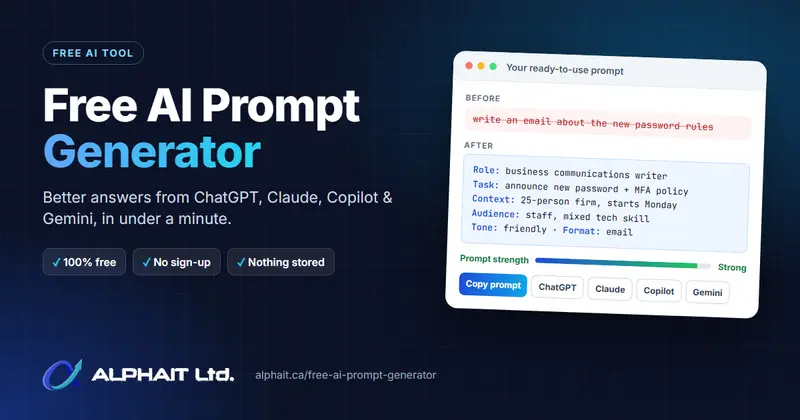
On this page
- Why do your AI prompts matter so much?
- What is the AlphaIT Free AI Prompt Generator?
- What makes a good AI prompt?
- Task: Write an email to all staff announcing our new password and MFA policy, starting Monday.
- Context: 25-person accounting firm; 14+ character passwords; Microsoft Authenticator…
- Audience: staff with mixed technical skill
- Requirements: friendly tone, clear subject line, one next step…
- How do you use the free AI prompt generator?
- What can a small business use it for?
- How can your team use AI without putting data at risk?
- Frequently asked questions
- Better prompts, better answers
By AlphaIT · October 3, 2026 · 8 min read
Most bad AI answers come from vague prompts, not from bad AI. If you’ve ever typed “write an email about the new password rules” into ChatGPT and then spent ten minutes fixing what came back, you know the problem. We built the AlphaIT Free AI Prompt Generator to fix that. It turns a rough idea into a clear, structured prompt for ChatGPT, Claude, Microsoft Copilot or Google Gemini in under a minute. It’s free, needs no sign-up, and nothing you type leaves your browser.
This guide covers why prompts matter, what the generator does, how to use it step by step, and how your team can use AI at work without putting client data at risk.
Key takeaways
- AI use at work is climbing fast in Canada: the share of workers using generative AI rose from 17% to 30% between September 2024 and July 2025 (Statistics Canada).
- A good prompt has four parts: a role, real context, a defined output and guardrails. The free generator builds all four for you.
- It works with ChatGPT, Claude, Copilot and Gemini. It’s 100% free, needs no account, and stores nothing.
- Never paste passwords or client records into a free AI tool. The generator flags sensitive details and swaps them for placeholders.
Why do your AI prompts matter so much?
AI tools answer the question you ask, not the one you meant. Give a chatbot one vague line and it fills the gaps with guesses, so you get a generic answer that’s missing your dates, your tools and your audience. A few extra sentences of context usually make the difference between a throwaway draft and something you can send.
That matters because AI is now part of the workday for a lot of Canadians. Statistics Canada’s Canadian Survey on Working Conditions found that the share of workers using generative AI nearly doubled, from 17% in September 2024 to 30% in July 2025 (Statistics Canada, June 2026). Business use is climbing too: 12.2% of Canadian businesses used AI to produce goods or deliver services in the year before Q2 2025, double the 6.1% a year earlier (Statistics Canada, June 2025).Generative AI use in Canada is rising17%Sep 202430%Jul 2025Workers using generative AI6.1%Q2 202412.2%Q2 2025Businesses using AISource: Statistics Canada, Canadian Survey on Working Conditions (2026) and Canadian Survey on Business Conditions, Q2 2025.
Small and mid-sized businesses are moving fastest. In an Edelman survey of 300 Canadian SMB decision-makers for Microsoft, 71% said they already use AI or generative AI in their operations (Microsoft Canada, June 2025). The tools are already in your office. The skill that separates useful output from wasted time is how people ask. If you’re still getting to know the tools, our plain-English explainer ChatGPT, explained for beginners is a good place to start.
What is the AlphaIT Free AI Prompt Generator?
The AlphaIT Free AI Prompt Generator is a free web tool that turns a short description of what you need into a complete, well-structured prompt you can paste into any chat-based AI. You describe the job in plain words, choose a few settings, and it writes the prompt.
- 100% free, no limits. No sign-up, no email address, no usage cap.
- Private by design. The prompt is built entirely in your web browser. Nothing you type is sent to AlphaIT or saved.
- Tuned for each AI tool. Pick ChatGPT, Claude, Microsoft Copilot, Google Gemini, or “not sure”. When you choose Claude, the prompt uses the XML-style sections Claude follows best (Anthropic’s prompting guide recommends this). For the others it uses clear headings.
- Ready-made starting points. Templates include a staff email, fixing slow Wi-Fi, a backup policy, a meeting summary, service page copy and explaining a topic.
- A prompt strength meter. It shows what to add next for a better result.
- One-click open. Copy the prompt, download it as a .txt file, or open it straight in ChatGPT, Claude, Copilot or Gemini.
What makes a good AI prompt?
A strong prompt has four parts: a clear role, real context, a defined output, and guardrails. Every prompt the generator builds includes all four, and OpenAI’s and Anthropic’s own prompting guides give the same basic advice: be specific, give context, and say what format you want (OpenAI; Anthropic).
- A clear role. Telling the AI who to be, such as an IT technician, a copywriter or an HR advisor, sets the right expertise and vocabulary.
- Real context. Your situation, your constraints and what you’ve already tried. This is the single biggest quality boost.
- A defined output. Format, length, tone and audience, so the answer is ready to use rather than a starting point.
- Guardrails. Rules like “ask me before guessing” and “don’t invent facts or sources” cut down on confident mistakes.
Typical prompt
write an email about the new password rules
Result: a generic email that misses your dates, your tools and your staff’s concerns.
Generated prompt
You are a professional business communications writer.
Task: Write an email to all staff announcing our new password and MFA policy, starting Monday.
Context: 25-person accounting firm; 14+ character passwords; Microsoft Authenticator…
Audience: staff with mixed technical skill
Requirements: friendly tone, clear subject line, one next step…
Result: a send-ready email on the first try, in your tone, with the right details.Same request, two prompts. The structured version gives the AI what it needs to get it right the first time.
How do you use the free AI prompt generator?
It takes four steps and about a minute. You don’t need any technical knowledge: if you can describe the job to a colleague, you can build a good prompt.
Step 1: Start from a template (optional)
Pick a starter such as Staff email, Fix slow Wi-Fi or Meeting summary to see a worked example, then change it to fit your situation.
Step 2: Describe what you need
Write what you want the AI to do in plain words; one sentence is enough to start. Then add background: who it’s for, why you need it, and what you’ve already tried. The more context you give, the better the prompt.
Step 3: Fine-tune the settings
Sensible defaults are already set, so only change what matters to you:
- Task type: email, IT troubleshooting, policy or SOP, summary, marketing copy, code, data analysis, planning and more.
- Tone: professional, friendly, plain English, persuasive, formal, technical or concise.
- Output format and length: bullet points, table, checklist, numbered steps, ready-to-send email, and short, medium or detailed.
- Language: Canadian or US English, French, Spanish, Punjabi, Hindi, Tagalog, Mandarin Chinese or Arabic.
- More options: list must-haves and things to avoid, paste an example of the style you like, and switch on guardrails. You can ask the AI to check with you before guessing, to flag anything it’s unsure of, to explain its reasoning, or to give you three versions to choose from.
Step 4: Copy it and go
Your prompt appears as you type, with a strength meter that tells you what’s missing. Copy it, download it for reuse, or open it straight in ChatGPT, Claude, Copilot or Gemini.
Try the free AI prompt generator →
What can a small business use it for?
Anything you’d hand to a capable assistant with a clear brief. These are the jobs we see Edmonton offices use AI for most:
- Staff communications: policy announcements, onboarding emails and reminders, written in your company’s tone.
- IT troubleshooting: describe the symptoms (for example “Wi-Fi drops every afternoon”) and get a step-by-step checklist to work through before you call support.
- Policies and SOPs: first drafts of a backup policy, an acceptable-use policy or a new-hire checklist.
- Meeting and document summaries: pull out decisions, owners and deadlines.
- Marketing copy: service page drafts, social posts and email campaigns. Pair it with our free SEO analyzer to check the page once it’s live.
- Learning something new: ask the AI to explain a topic at your level, step by step.
How can your team use AI without putting data at risk?
Treat free, personal AI accounts like a public website: don’t paste passwords, client records or financial details into them. This is the habit that matters most, and it’s often missing. LayerX Security’s Enterprise AI and SaaS Data Security Report 2025 found that 77% of employees who use generative AI paste data into chatbot prompts, 22% of those pastes include personal or payment card data, and 82% come from unmanaged personal accounts (The Register, October 2025).How employees share data with AI chatbotsAI users who paste data77%Pastes from personal accounts82%Pastes with personal/card data22%Source: LayerX Security, Enterprise AI and SaaS Data Security Report 2025 (as reported by The Register, October 2025).
The generator helps here. It warns you if it spots passwords, email addresses, phone numbers, card numbers or API keys in what you’ve typed, and it can replace them with placeholders for you. Beyond the tool, four habits keep your business safe:
- Use placeholders, not real data. Swap names, client details and account numbers for [CLIENT], [ACCOUNT] and so on.
- Use business accounts. Work accounts such as Microsoft 365 Copilot come with stronger data protection than personal, free logins.
- Check before you send. AI can sound sure and still be wrong. Verify facts, figures and anything legal or financial.
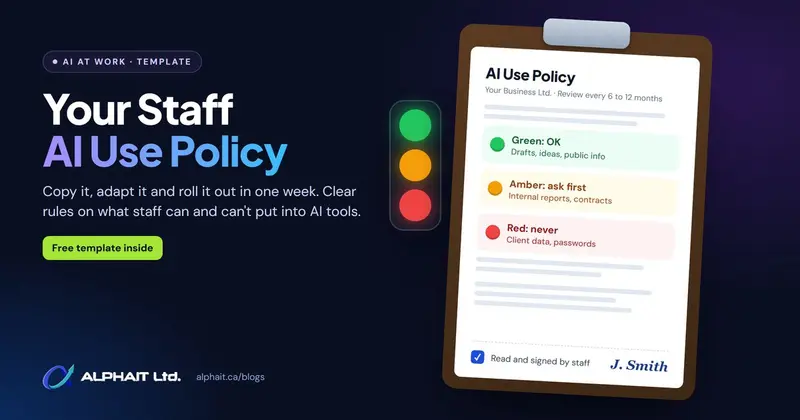
- Agree on the rules. A short AI use policy tells staff which tools are approved and what must never be shared. Pair it with good basics like a business password manager and email security.
Want your whole team using AI safely?
AlphaIT helps Edmonton businesses roll out Microsoft 365 Copilot, write a practical AI use policy, and train staff to get useful answers without exposing client data. Book a free consultation
Frequently asked questions
Is the AI prompt generator really free?
Yes. It’s completely free, with no sign-up, no email address and no usage limits.
Is what I type stored or sent anywhere?
No. The prompt is built entirely in your web browser, so nothing you type is sent to AlphaIT or saved. Once you paste the prompt into an AI tool, that tool’s own privacy terms apply.
Which AI tools does it work with?
Any chat-based AI tool, including ChatGPT, Claude, Microsoft Copilot and Google Gemini. Choose your tool and the generator formats the prompt to suit it. For more on Claude, see our roundup of the latest Claude updates for business.
Why does the prompt tell the AI to ask questions first?
Most bad AI answers come from missing information. Asking the AI to check with you before it guesses gets you the right answer sooner. You can switch this off under More options.
Can I write prompts in French or Punjabi?
Yes. You can set the output language to Canadian or US English, French, Spanish, Punjabi, Hindi, Tagalog, Mandarin Chinese or Arabic.
Better prompts, better answers
AI is already part of how Canadian businesses work. The difference between a frustrating chatbot and a useful assistant is usually the prompt. To recap:
- Give the AI a role, real context, a clear output and guardrails.
- Let the free AI prompt generator build that structure for you in under a minute.
- Keep passwords and client data out of free AI tools, and use business accounts for real work.
Try it on the next email or IT problem on your list. If you’d like help setting up AI properly across your team, AlphaIT’s managed IT support team in Edmonton is happy to help.