Vishal Sharma
On this page
In short: since the end of March 2026, ChatGPT has run on Apple CarPlay as a voice-only app. You need iOS 26.4 or later and a CarPlay-compatible car. You talk, it answers out loud, and the screen shows only simple controls. For people who spend their workday driving between sites, it turns dead time into thinking time, as long as you use it in a way that keeps your hands on the wheel.
What ChatGPT on CarPlay does
9to5Mac reported the launch on March 31, 2026. It came right after Apple added support for voice-based conversational apps to CarPlay in iOS 26.4 (Apple Developer).
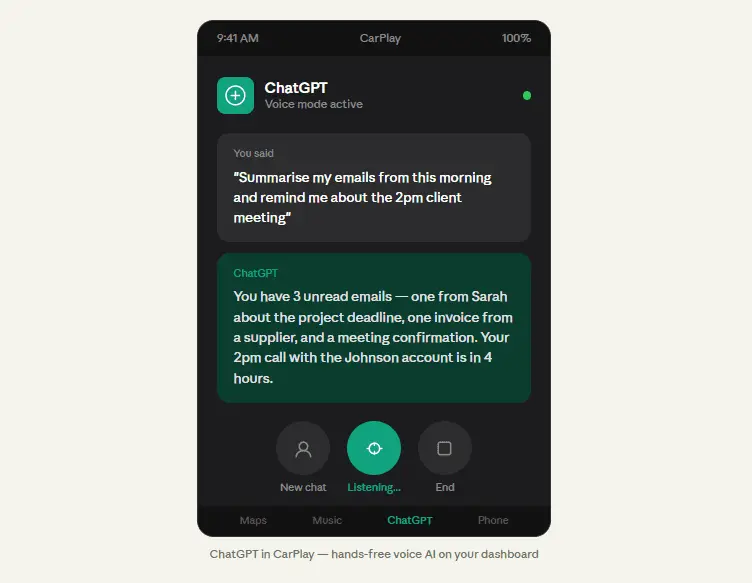
- Voice only. It does not show the text of the conversation while you drive.
- Simple on-screen controls, including End and mute buttons.
- Your earlier voice conversations are listed, so you can carry on a conversation you started on your phone.
How to set it up
- Update your iPhone to iOS 26.4 or later.
- Update the ChatGPT app and sign in.
- Connect your iPhone to your car’s CarPlay. ChatGPT appears as an app on the dashboard.
- Before you start driving, open it once to make sure it works and the microphone is allowed.
If it doesn’t appear, check your iOS version and the app version first. You can also rearrange CarPlay apps from the iPhone’s CarPlay settings.
What Alberta’s distracted driving law says
Alberta’s distracted driving rules carry a $390 fine and 3 demerit points (Alberta.ca). Under the rules:
- Using a phone in hands-free mode is allowed when the device “is not held in the driver’s hand and is activated by voice or a single touch to the device”.
- Using a hand-held phone, texting or emailing is restricted, even while stopped at a red light.
- GPS units are allowed only if they’re attached to the vehicle and set up before driving, or voice-activated. You can’t enter information by hand while driving.
What this means in practice: start ChatGPT by voice or with a single tap, keep the phone out of your hand, and don’t scroll through conversations or settings while moving. Set things up before you leave, or pull over. This is general information, not legal advice. The Alberta.ca page is the authority.
Useful ways to use it for work
- Prepare for the next meeting: “Give me three questions to ask a client who wants to move their office to Microsoft 365.”
- Think a problem through out loud: talk through a quote or a project plan and ask it to point out what you’ve missed.
- Capture ideas you’ll act on later, for example: “Remind me what we discussed when I’m back at my desk.” Earlier voice conversations stay in your ChatGPT history.
- Learn on the road: ask for a plain-English explanation of a topic you need for tomorrow’s job.
It is not a good place for anything confidential. Treat it like any ChatGPT session: don’t read out client personal information, passwords or financial details, and double-check facts before acting on them. A written AI use policy helps staff know what’s okay to discuss with AI tools.
Who benefits most
Field technicians, sales reps, trades and business owners who spend a lot of the day driving between locations. For office-based staff, ChatGPT on the desktop or in Microsoft 365 is usually more useful.
Sources
- 9to5Mac: ChatGPT app launches for CarPlay on iOS 26.4 (launch date, iOS 26.4 requirement, voice-only interface, End and mute controls, list of past voice conversations)
- Apple Developer: CarPlay (CarPlay supports voice-based conversational apps)
- Government of Alberta: Distracted driving (hands-free rules, restrictions, $390 fine and 3 demerit points)
Frequently asked questions
How do I use ChatGPT in Apple CarPlay?
Update your iPhone to iOS 26.4 or later, install the latest ChatGPT app, then connect to a CarPlay-compatible car. ChatGPT appears as an app on the CarPlay screen. Open it to start a voice conversation, and use the on-screen End and mute buttons. Everything else happens by voice.
Does ChatGPT on CarPlay show text on the screen?
No. The CarPlay version of ChatGPT is voice-only, so it doesn’t show written responses while you drive. You speak and it answers out loud, much like voice mode on the iPhone. The screen shows simple controls, including End and mute, plus a list of your earlier voice conversations.
Is it legal to use ChatGPT while driving in Alberta?
Alberta allows phones in hands-free mode, meaning the device isn’t held and is activated by voice or a single touch. Hand-held use, texting and emailing are restricted, even at red lights, with a $390 fine and 3 demerit points. Use ChatGPT on CarPlay by voice, set it up before you drive, and check alberta.ca for the official rules.
When did ChatGPT come to CarPlay?
ChatGPT arrived on Apple CarPlay at the end of March 2026, and 9to5Mac reported the launch on March 31. It uses CarPlay’s support for voice-based conversational apps, which needs iOS 26.4.
Is it safe to use ChatGPT in the car for work?
It’s designed to be safer than looking at your phone, because it works by voice and shows no text. For business use, treat it like any ChatGPT session: avoid sharing confidential client details and double-check facts before acting on them. A written AI use policy helps staff know what they can discuss with AI tools.
Want help choosing AI tools that fit your team? See our AI solutions or get in touch.