Vishal Sharma
On this page
- What did Google actually launch, and where?
- Which businesses will get these calls?
- What will an AI booking call sound like?
- A front-desk script for AI calls
- Privacy: what never goes to an unknown caller
- Your Business Profile is the AI’s cheat sheet
- Should you offer online booking instead?
- Should you opt out of AI calls?
- How to spot a scammer pretending to be an AI
- Sources
- Frequently asked questions
On November 17, 2026, Google made Tasks in Gemini (the agent it first called Spark) free in six countries: the US, Canada, India, Australia, Japan and Korea. So yes, your customers in Edmonton can use it today. But the headline feature, Gemini phoning a business to book an appointment, is listed only for US businesses. Google’s release notes title it “Ask Gemini to call US businesses for you”, and Google’s calling help page says Gemini “can only make phone calls to US phone numbers.” No Canadian date has been announced. So this is a “get ready” post, not a “it’s happening today” post. When it does arrive, the call will open with Gemini saying it’s an AI assistant from Google, on a recorded line, calling for a named person. Your front desk needs a short script, a hard line on private information, and a Business Profile that’s accurate, because that’s what the AI reads before it dials.
Back in our post on Google AI Mode and your website, I wrote that Google “hasn’t said when, or whether” its AI calling comes to Canada. That’s still true for calling. What changed is that the agent itself is now in Canadian hands for free.
What did Google actually launch, and where?
The reporting was a bit muddled, so here’s what Google’s own pages say.
| Question | Answer | Where it comes from |
|---|---|---|
| Who gets Tasks free? | People in the US, Canada, India, Australia, Japan and Korea. Google calls this “hundreds of millions of people.” | Google blog post (Nov 17) and Gemini release notes |
| Can it call businesses? | Yes, but the calling entry is titled for US businesses | Gemini release notes, Nov 17 |
| Can it call Canadian numbers? | No, not yet. “For now, Gemini can only make phone calls to US phone numbers.” | Gemini Help: “Ask Gemini to handle your everyday phone calls” |
| Can it buy things? | Yes, with Google Pay, after the user confirms. Listed as US-only, English, 18+ | Release notes |
| How does it introduce itself? | “An AI assistant from Google calling on a recorded line on your behalf,” plus the user’s name | Gemini Help |
| Can businesses opt out? | Yes, “at any time” | Release notes; Google’s blog links to the Business Profile help page |
So the two news stories don’t really disagree. “Six countries” (9to5Google) and “hundreds of millions” (TechCrunch) describe the same free rollout. Neither says calling works in Canada, and Google’s pages say it doesn’t yet. Even in the US there are gaps: Google’s footnote says calling isn’t available in Indiana, Louisiana, Minnesota, Montana or Nebraska.
Josh Woodward, who runs the Gemini app, gave the example in Google’s post. Gemini found the two nearest dealerships on Google Maps, called both at once, sat through the hold music and booked a minivan service. He says “Gemini disclosed right away that it’s an AI.”
Which businesses will get these calls?
Google hasn’t published a category list for Gemini calling. The examples it uses are car dealerships, restaurants and dry cleaners. The jobs it lists are checking hours, asking about stock, getting quotes, booking or changing appointments, and waiting on hold or getting through a phone menu.
Separately, at I/O in May, Google said Search would call businesses for people in “select categories like home repair, beauty or pet care.” Google’s Business Profile help page adds checking restaurant wait times and confirming prices.
My read for Edmonton: if people book you by phone, assume you’re in scope eventually. That covers dental and medical clinics, salons, contractors and restaurants. Clinics are the ones I’d prepare first, because a booking call there brushes up against health information.
What will an AI booking call sound like?
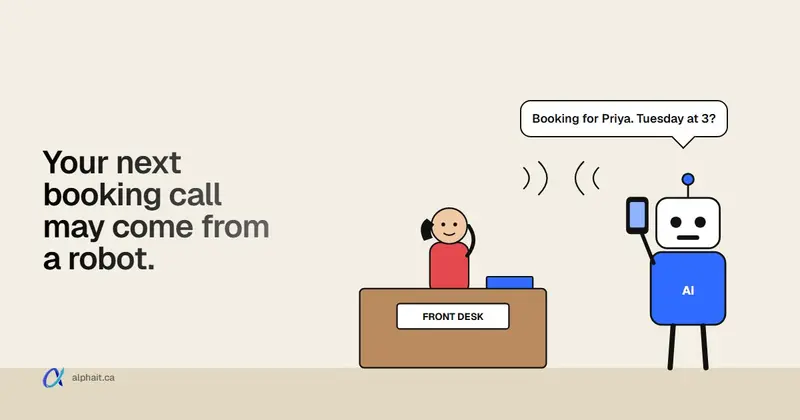
Based on Google’s help page, expect something like this:
“Hi, I’m an AI assistant from Google calling on a recorded line on behalf of Priya Shah. She’d like to book a cleaning, ideally Friday morning. Do you have anything open?”
A few things to know about how it behaves:
- It’s booking for its user, not asking about anyone else. Its job is to get a time, a price or an answer and report back.
- The person can be listening. The user approves a call plan first, can follow a live transcript, and can take over the call.
- It won’t hand over sensitive details. Google says it won’t share health information, card numbers, passwords or similar data over the phone. It can’t pay you either.
- It may call at the same time as your competitor. In Google’s example it rang two shops at once. Whoever answers clearly and has a time gets the booking.
A front-desk script for AI calls
Print this and put it by the phone. It works whether the caller is Gemini, another company’s AI, or a person.
- Confirm who it’s for. “Sure. Who is the appointment for?” The AI should give its user’s name.
- Treat it like any new booking. Offer times, give the price range if you share it on the phone, explain what to bring.
- Ask for the user’s contact number for the confirmation. Text or call that number, not the number the AI called from.
- Hold what needs the real person. “We’ll need her date of birth and health card to finish. We’ll send a link, or she can call us.” Don’t take that from an AI.
- Keep the deposit off the call. It can’t pay you anyway. Send your normal payment link to the customer.
- Log it. Note “booked via AI assistant” in the appointment so staff know to confirm with the person.
If something feels wrong, end politely: “I’ll confirm directly with the customer. Thanks.” Then call the customer on a number you already have.
Privacy: what never goes to an unknown caller
This is where clinics and anyone holding customer records need a firm rule. The AI is booking for someone. It is not entitled to ask about anyone.
- Never confirm whether someone is a patient or client. “Is John Smith one of your patients?” gets “I can’t share that.”
- Never read out appointment details, balances, chart notes or test results. Not to an AI, not to a human who can’t be verified.
- Don’t accept health card numbers, birth dates or card numbers by voice from an AI. Google says its assistant won’t share those anyway. If a “Google AI” offers them or asks for yours, that’s a warning sign.
- Bookings are fine. Disclosures aren’t. Telling a caller “we have 9:30 on Friday” is the same as telling anyone who phones. Telling them anything about an existing patient is not.
An AI caller doesn’t change the phone rules you already follow. If your clinic needs help writing this down for staff, our IT support for dental clinics and medical clinics teams do this kind of policy work.
Your Business Profile is the AI’s cheat sheet
In Google’s example, Gemini picked which businesses to call from Google Maps. That means your Google Business Profile decides whether you get the call and what the AI expects when you answer. If your profile says you open at 8 and you open at 9, the AI will call at 8:15 and give up.
Check these this week:
- Hours, including holiday hours. December is coming. Set them now.
- Phone number. It should ring a desk that’s staffed, not a fax line or a voicemail box that’s full.
- Services, using the words customers use. “Teeth whitening,” “furnace tune-up,” “balayage.” The AI matches what the user asked for.
- Prices or “starts at” figures where you’re comfortable publishing them. Fewer calls just to ask a price.
- Booking link. If your category supports it, add your online booking page in the profile’s booking or appointment link field.
Our Business Profile guide for dental clinics covers categories, services and common mistakes in detail, and most of it applies to any local business. For the wider question of how AI tools find and describe you, see our AI search optimization service.
Should you offer online booking instead?
If you can, yes. An AI agent that can book online doesn’t need to phone you at all. Google’s Tasks already browses websites, fills in forms and signs in when the user allows it. A clear online booking page is something it can use without tying up your front desk.
What makes a booking page easy for a person or an agent to use:
- One link per location, with real availability synced to your schedule.
- Plain service names and durations, matching your Business Profile.
- Confirmation by email or text to the customer, so the person, not the AI, gets the details.
Two cautions. Booking widgets are third-party code on your website, so treat them like any other script. Our post on the Optimizely script attack explains why that matters. And clinics should check where a booking tool stores patient data before collecting anything beyond name, contact and reason for visit.
If you’d like help picking a booking tool or setting up AI on your own side of the phone, that’s what our AI solutions team in Edmonton does.
Should you opt out of AI calls?
Google’s help page says a business can opt out. Here’s the path Google gives:
- Sign in at business.google.com. Your profile must be verified.
- Select More, then Business Profile settings, then Advanced settings.
- Under “Google automated calls and text messages,” turn off “Bookings and inquiries from customers.” The other two toggles are “Keep your profile up to date” and “Post to your profile on your behalf.”
You can also tell a Google AI caller “Please stop calling my business,” or reply STOP to an automated text.
One catch for Canadian businesses: Google’s help page says these calls are “currently available only in select regions and languages,” and lists US states only. I haven’t confirmed whether Canadian profiles show this section yet. If yours doesn’t, there’s nothing to switch off today. Check again when Google announces Canadian calling.
Should you? My view:
| Opt out if… | Stay in if… |
|---|---|
| Every booking needs ID checks or a referral, and a half-booked call wastes staff time | You get lots of simple bookings and quote requests by phone |
| Your phone line is already overloaded | You’d rather win the call than have the AI book your competitor |
| You can’t staff the phone during your listed hours | Your profile and hours are accurate and someone answers |
For most salons, contractors and restaurants, I’d stay in. A customer who asks Gemini to “book me a haircut Friday” will get one somewhere. For a busy clinic with a strict intake process, opting out of AI bookings is reasonable, as long as you offer online booking instead. If you turn off the bookings toggle, check what the other two do before touching them. “Keep your profile up to date” calls confirm your hours and details, which can help you.
How to spot a scammer pretending to be an AI
Scammers copy whatever’s in the news. Expect callers using a robotic voice or the words “Google AI” to sound legitimate. Here’s what gives them away.
- They ask for money, card numbers or passwords. Google says it “will never ask for payment, credit card information, or account passwords.” Gemini also can’t take payments.
- They ask about your patients or customers. A real booking assistant books for its user. It doesn’t fish for records.
- They say your listing will be suspended or “unverified.” Hang up. Sign in at business.google.com yourself and check.
- They send a link or code by text and ask you to read it back. That’s an account takeover attempt.
- They claim to be Google calling a Canadian number to book, today. Google says Gemini only calls US numbers for now. That could change, but right now it’s a reason to be careful.
- They don’t say who the booking is for. A real Gemini call names the person it’s calling for.
Callers who claim to be your IT provider follow the same pattern. Our fake help desk phone scam guide has the call-back rule and a staff checklist, so I won’t repeat it here.
If you only do one thing this week, check your Business Profile hours and phone number and fix anything wrong. It helps with AI callers, AI search and plain old humans.
Sources
- Google: Tasks in Gemini, now free with new features (Josh Woodward, November 17, 2026: six countries, minivan example, AI disclosure, opt-out link, US state exclusions)
- Gemini Apps release notes (November 17, 2026 entries: free Tasks rollout countries, “Ask Gemini to call US businesses for you”, AI identification, opt-out)
- Gemini Help: Ask Gemini to handle your everyday phone calls (US numbers only, opening disclosure, what Gemini won’t share, no telemarketing)
- Google Business Profile Help: About automated calls and texts from Google to your business (opt-out path and toggles, regions, “never ask for payment”)
- Google: Search announcements from I/O 2026 (calling in “select categories like home repair, beauty or pet care”)
- 9to5Google: Gemini Tasks free (November 17, 2026)
- TechCrunch: Google expands access to Gemini Tasks (November 17, 2026)
- iPhone in Canada: Gemini can now make phone calls for you, Canada has to wait
Frequently asked questions
Is Gemini Tasks available in Canada?
Yes. Since November 17, 2026, Tasks in Gemini is free in Canada, the US, India, Australia, Japan and Korea. Some features, including calling businesses and paying with Google Pay, are listed for the US only.
Can Gemini call Canadian businesses?
Not yet. Google’s help page says Gemini can only call US phone numbers for now, and the calling feature is described as being for US businesses. Google hasn’t announced a date for Canada.
How do I know if a call is from Google's AI?
A real Gemini call starts by saying it’s an AI assistant from Google calling on a recorded line, and it names the person it’s calling for. It won’t ask for payment, passwords or private information, and it can’t take a payment.
How do I stop Google's AI from calling my business?
Sign in at business.google.com, select More, then Business Profile settings, then Advanced settings. Under “Google automated calls and text messages,” turn off “Bookings and inquiries from customers.” Google says the feature is only in select regions, so Canadian profiles may not show it yet.
Can my clinic book a patient through an AI caller?
You can offer times and hold a slot, like any phone booking. Don’t share or accept health information through the AI. Send the confirmation and intake forms to the patient directly and confirm details with them.
Want help getting your Business Profile, booking page and front-desk phone rules ready before AI calling reaches Canada? AlphaIT’s AI solutions team can set it up with you. Contact us.