On October 21, 2026, the PHP project released urgent security updates for two critical vulnerabilities that can let an attacker run code on a web server without logging in. PHP powers WordPress, WooCommerce and many other websites and business applications, so if your business has a website, this almost certainly affects you. Fixed versions are available now.
Last updated: October 21, 2026. We will update this post if the guidance changes.
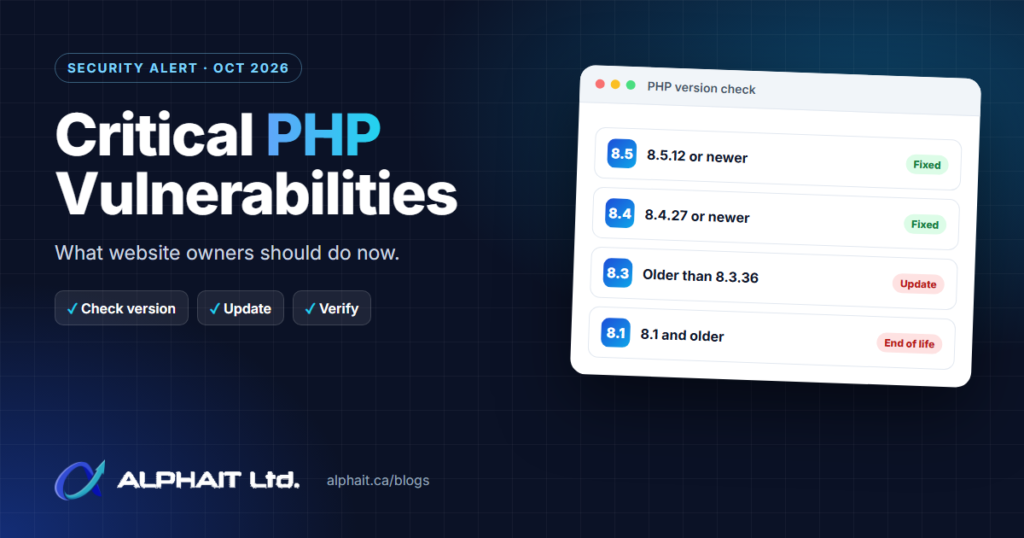
- Update PHP now to 8.5.12, 8.4.27, 8.3.36 or 8.2.35 (or newer). The PHP project says updating is the only complete fix.
- Both flaws are rated critical (CVSS 9.2) and can allow unauthenticated remote code execution.
- Proofs of concept are circulating, so CERT-EU warns attackers may already be exploiting them.
- On shared or managed hosting, your host must apply the update. Ask them to confirm it.
- PHP 8.1 and older no longer get official updates. Plan an upgrade now.
What happened?
On October 20, 2026, the PHP project gave advance notice of two critical vulnerabilities, and on October 21 it released fixes. In its announcement, the PHP project said the new versions “fix two critical vulnerabilities that can allow unauthenticated remote code execution” and that “All PHP users are strongly encouraged to update immediately.”
The same day, CERT-EU, the cybersecurity service for the EU institutions, published Security Advisory 2026-018. Its first version recommended identifying PHP applications and preparing to patch as soon as fixes were available. Its updated version notes the patches are out and “strongly recommends updating all affected PHP installations as soon as possible.”
| Vulnerability | Severity | What it is, in plain English |
|---|---|---|
| CVE-2026-109618 RCE via out-of-memory corruption |
Critical, CVSS 9.2 | When a request runs out of memory very early, PHP can stop part-way through setting things up and later treat that half-finished data as valid. An attacker can trigger this on purpose, for example with oversized or complex requests. |
| CVE-2026-109619 RCE via stale global state |
Critical, CVSS 9.2 | Leftover data from one request can survive after its memory has been freed, and a later request handled by the same PHP worker can use it before it is reset. |
Sources: PHP project news, GHSA-w8hw-w9fx-j79w, GHSA-6wmf-4rv5-p3rp.
Am I affected?
Probably, if you run any website or web application built on PHP. The PHP project says the risk covers “all PHP installations serving web requests, including PHP-FPM, Apache with mod_php, php-cgi, FrankenPHP and LiteSpeed,” and it considers the risk highest for Apache with mod_php, where it demonstrated an attack that works “before any application code runs.” In other words, keeping WordPress and its plugins up to date does not protect you here. The problem is in PHP itself.
Common things that run on PHP:
- WordPress websites and WooCommerce stores
- Drupal, Joomla and Magento sites
- Learning, booking and intranet tools such as Moodle and Nextcloud
- Web control panels and some appliances or products that embed PHP. CERT-EU notes that third-party software embedding PHP may also be affected, so check your vendors’ advisories.
Affected and fixed versions
| PHP branch | Vulnerable | Fixed in |
|---|---|---|
| 8.5 | Older than 8.5.12 | 8.5.12 |
| 8.4 | Older than 8.4.27 | 8.4.27 |
| 8.3 | Older than 8.3.36 | 8.3.36 |
| 8.2 | Older than 8.2.35 | 8.2.35 |
| 8.1 and older | Yes | No official release. See below. |
How to check your PHP version
- WordPress: go to Tools > Site Health > Info, open the Server section and look at “PHP version”.
- Hosting control panel: most panels show it under a “PHP version” or “PHP configuration” setting.
- Your own server: run
php -von the server, and check the version used by the web server too (aphpinfo()page, removed straight afterwards, shows it).
One catch: Linux distributions such as Debian, Ubuntu and Red Hat often apply security fixes to their own PHP packages without changing the main version number. If your server uses distribution packages, check your distribution’s security notice rather than relying on the number alone.
What to do now
If your website is on shared or managed hosting
- Contact your host today and ask: “Have you updated PHP to a release that fixes CVE-2026-109618 and CVE-2026-109619 for my site, and has PHP been restarted?”
- If your site is set to an old PHP version in the control panel, switch to a supported version that your host has patched. Test the site afterwards.
- Get the answer in writing. If your host can’t confirm a date, treat that as a reason to move the site.
If you run your own server or VPS
- Take a backup or snapshot first. Then confirm you can restore it; our guide on how to test backups explains how.
- Update PHP to a fixed release from the PHP project, your distribution or your vendor.
- Restart PHP. Restart PHP-FPM, Apache or LiteSpeed so every worker process loads the fixed version. Running workers keep the old code until they restart.
- Confirm the version your website actually uses, not just the command-line version.
- Repeat for every server, including staging, test and forgotten old sites.
If you can’t update straight away
CERT-EU advises that organisations “should consider isolating internet-facing resources from public networks” until they can patch. For a small business, that could mean temporarily putting the site behind a maintenance page served from a patched server, limiting access to known IP addresses or a VPN, or taking a non-essential internal tool offline.
The PHP project and CERT-EU list partial mitigations for administrators, such as limiting request sizes, disabling session upload progress and recycling PHP workers more often. They are clear that these are not a substitute: in the PHP project’s words, “There are no complete mitigations, updating is the only safe choice.”
What if we’re on PHP 8.1 or older?
PHP 8.1 and older are end-of-life and do not receive official updates. Given the severity, the PHP project says it provided minimal source-level fixes for PHP 7.4, 8.0 and 8.1 for people who build PHP from source, and it notes that some distributions and long-term-support vendors provide backported fixes. For most small businesses, the right answer is to move to a supported PHP version. Older WordPress themes and plugins can break on newer PHP, so test on a copy of the site first, update or replace anything incompatible, then switch.
After patching: check for signs of compromise
Because proofs of concept were already circulating, CERT-EU says this “raises the likelihood that attackers are already exploiting the vulnerabilities.” Once you’ve patched, take a few minutes to look for anything unusual:
- Admin users you don’t recognise in WordPress or other applications.
- New or changed files you didn’t add, especially PHP files in upload folders.
- Unexpected redirects, spam pages, or changes to
.htaccessor configuration files. - New scheduled tasks or unfamiliar processes on the server.
- Unusual outbound traffic or spikes in errors in your server logs around October 20 and 21.
If you find something, don’t just delete it. Take the site offline, preserve the logs, change passwords and keys, and restore from a clean backup taken before the problem started.
Frequently asked questions
Does updating WordPress fix this?
No. These flaws are in PHP, the software that runs WordPress. You still need your host or server administrator to update PHP itself.
Is my website at risk if it has no customer login or online store?
Yes. The PHP project describes an attack that works with one unauthenticated request, before any application code runs, so a simple brochure site running on a vulnerable PHP version is still exposed.
Is a web application firewall enough?
A firewall or security service may block some attack attempts, but the PHP project says only updating fully fixes these vulnerabilities. Use a firewall as an extra layer, not a replacement for the update.
How do I know if my host has patched?
Ask them directly and check the PHP version in WordPress Site Health or your control panel. A reputable host should confirm the fixed version and that PHP has been restarted.
Related guides: How to test your backups, when to replace a firewall, how to set up MFA in Microsoft 365.
Need help checking your website or servers?
AlphaIT builds, hosts and secures websites and servers for Edmonton businesses. If you’re not sure which PHP version your site runs or whether your host has patched, we can check it with you. See our cybersecurity services and website development, take our free 3-minute IT check, or call 780-318-0149.