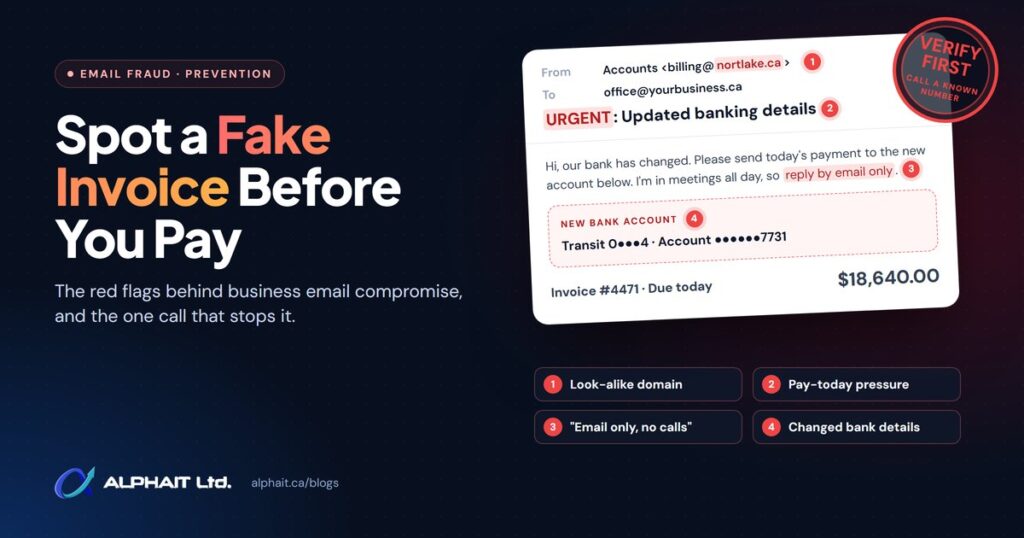
A fake invoice scam usually doesn’t look fake. It arrives from a supplier you already pay, mentions a real order, and asks you to send this month’s payment to a “new” bank account. The fix is simple and costs nothing: never act on a bank-detail change until you have confirmed it by phone, using a number you already had before the email arrived.
This guide explains how the scam works, the red flags to look for on an invoice or email, a call-back process your office can adopt today, and exactly what to do in the first few hours if money has already gone out.
Key takeaways
- Most fake invoice emails ask for one thing: a change to where you send the money. Treat every bank-detail change as suspicious until verified.
- Verify by calling a phone number you already have on file. Never use the number, link or “new contact” in the email itself.
- If you paid, call your bank’s fraud line first, then report to the police and the Canadian Anti-Fraud Centre. Minutes matter.
- Check the mailbox that received the email too: reset the password, sign out all sessions, look for hidden forwarding rules and turn on MFA.
- Prevention is mostly process: two-person approval for payments, MFA on every mailbox, DMARC on your domain and alerts for new forwarding rules.
How does a fake invoice scam work?
The scam is a form of business email compromise, which the FBI’s Internet Crime Complaint Center describes in its 2025 annual report as a scam targeting businesses that work with suppliers or regularly make wire transfer payments, carried out by compromising email accounts and other forms of communication. The Canadian Anti-Fraud Centre lists the invoice version under spear phishing as payment redirection: a fraudster sends “a spoofed email informing the business of a change in payment details.”
There are two common routes.
Route 1: the real vendor mailbox is taken over
Someone steals a password at one of your suppliers (or in your own office) and quietly reads the mailbox. They learn who pays whom, how invoices look and when payments are due. Then they reply inside a real email thread with a “small update” to the banking details. Because the message really comes from your supplier’s account, it passes every technical check. Get Cyber Safe notes that fraudsters use real business details, often gathered from earlier breaches, to request money transfers or changes to payment details.
Route 2: a look-alike or spoofed address
Here the fraudster never gets inside a mailbox. They register a domain that is one letter off (for example, a supplier’s name with “rn” in place of “m”), or they fake the “From” line. The Canadian Anti-Fraud Centre warns that fraudsters can manipulate the sender’s email address to make a message look legitimate. On a phone screen, where only the display name shows, these are very hard to spot.
Why the timing feels right
The request usually lands when a real payment is expected: month end, after a delivery, or just before a long weekend. It often comes with pressure (“our old account is frozen,” “please pay today to avoid a late fee”) and sometimes a request to keep it quiet or to reply only by email. Urgency plus a bank change is the pattern to remember.
How common is payment redirection fraud?
In Canada, Get Cyber Safe reports that spear phishing, the targeted fraud that includes fake payment changes, “has caused more than $170-million in losses over the past three years”, based on Canadian Anti-Fraud Centre data. The same article says the centre received nearly 24,000 phishing reports over that period, making phishing the most reported type of cyber-enabled fraud in Canada.
For a sense of scale south of the border (this is US data, not Canadian), the FBI’s 2025 IC3 annual report recorded 24,768 business email compromise complaints with reported losses of US$3,046,598,558, second only to investment fraud.
Red flags on a fake invoice email
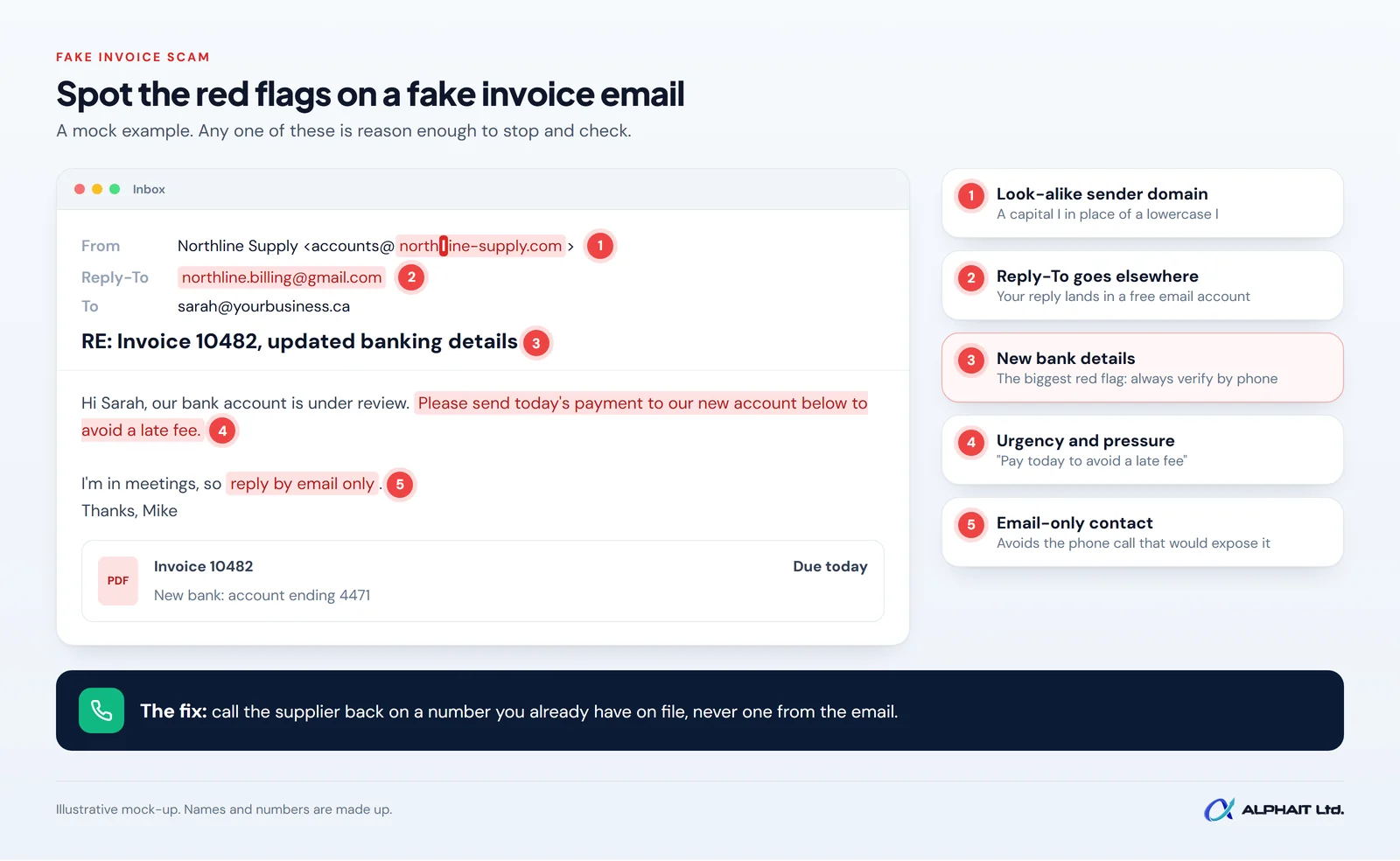
No single sign proves fraud, and a message from a hijacked vendor mailbox may show only one or two. Pause and verify if you see any of these:
- New or changed bank details. A new account number, a different bank, or an account in another province or country. This is the biggest red flag of all.
- A sender address that is almost right. Tap or hover on the name to see the full address. Look for swapped letters, extra words or a free email service in place of the company domain.
- A “Reply-To” that differs from the sender. Your reply goes somewhere other than the address you think you are writing to.
- Urgency or secrecy. “Pay today,” “the old account is closed,” “don’t call, I’m in meetings.”
- Small changes to a familiar invoice. Slightly different logo, fonts, totals or invoice numbering, or a PDF sent where you normally get a portal link.
- Contact details only in the email. A new phone number in the signature that you have never seen before.
The call-back rule: how to verify a bank-detail change
This is the single most effective control, and it costs nothing. The Canadian Anti-Fraud Centre’s advice is to call the company directly and to research their contact information and not use the information provided in the first message. The FBI gives similar advice: use secondary channels to verify requests for changes in account information.
We recommend writing the following into your office procedures:
- Stop. Do not pay, and do not update the vendor record in your accounting software yet.
- Find a number you already trust. Use the phone number from your vendor file, a past contract, or the supplier’s website typed in by hand. Never use a number or link from the email asking for the change.
- Call and ask an open question. “Have your banking details changed recently?” works better than “Can you confirm the new account ending 4471?”
- Confirm with someone you know. Ideally the person you normally deal with, or their accounts team.
- Record it. Note who you spoke to, the date, the time and the number you called. Attach the note to the vendor record.
- Get a second approval. A second person signs off before the new details are saved or any money moves.
- Consider a test. For large or regular payments, some businesses send a small amount first and confirm receipt by phone.
Apply the same rule to staff asking to change their direct deposit details. The Canadian Anti-Fraud Centre lists payroll redirect as another version of the same scam.
Already paid a fake invoice? What to do in the first hours
Move fast and do these steps in order. The goal is to stop the money and stop the fraudster from using the mailbox again.
| When | Action | Who |
|---|---|---|
| Immediately | Call your bank’s fraud or business line. Ask them to stop or recall the payment and to contact the receiving bank. Have the date, amount and account details ready. | Owner or bookkeeper |
| Within the first hour | Secure the mailbox that received the email (see below). If the vendor’s account seems compromised, phone them using a known number so they can secure theirs. | IT provider or Microsoft 365 admin |
| Same day | Report to your local police and to the Canadian Anti-Fraud Centre. | Owner |
| Same day | Save the evidence: keep the emails (don’t delete them), the invoice, the payment confirmation and your notes. | Whoever handled the payment |
| Within a few days | Tell your insurer if you have cyber or crime coverage, and review your payment process so it can’t happen the same way again. | Owner |
Speed matters because money can move on quickly. The FBI’s advice to US victims is to contact your financial institution immediately to request a recall. In Canada, the Canadian Anti-Fraud Centre asks victims to contact local police as soon as possible and to report to the centre, either online through the national reporting system or by phone at 1-888-495-8501 (Monday to Friday, 10 am to 4:45 pm Eastern).
How to secure the mailbox
If the email came through, or was answered from, one of your own accounts, assume that mailbox may be compromised until it has been checked. Microsoft’s guide to responding to a compromised email account lists warning signs such as inbox rules that forward mail to unknown addresses, rules that move messages into rarely checked folders, and newly added external forwarding. The core steps:
- Reset the password (or disable the account while you investigate). Microsoft warns not to send the new password to the user by email, since the attacker may still be reading it.
- Sign out every session. Revoking sessions ends any access that was using the stolen password.
- Check MFA methods and connected apps. Remove any phone or app you don’t recognize.
- Check forwarding and inbox rules, including hidden ones. Fraudsters often add a rule that hides replies from the real vendor.
- Turn on MFA if it wasn’t already on.
Some of these checks need admin tools. If you don’t have an in-house admin, this is the moment to call your IT provider. Our email security service includes this kind of mailbox clean-up and the protections that follow.
How to prevent a fake invoice scam
Two-person approval for payments
The Canadian Anti-Fraud Centre advises businesses to “only allow a small number of staff to approve purchases and pay bills.” We suggest pairing that with a rule that any new payee, or any change to a payee’s bank details, needs a second person’s approval and a documented call-back.
Multi-factor authentication on every mailbox
Most mailbox takeovers start with a stolen password. Get Cyber Safe explains that with multi-factor authentication (a second check, such as an app prompt, on top of your password), “if a cyber criminal ever gets your password, there’s another defence in place to stop them.” Our guide on setting up MFA in Microsoft 365 walks through it.
SPF, DKIM and DMARC on your domain
These three DNS records tell other mail servers which messages genuinely come from your domain. The Canadian Centre for Cyber Security’s email domain protection guidance (ITSP.40.065) says: “For complete protection, you must implement all three protocols and configure them to instruct recipients to reject inauthentic messages.” DMARC stops fraudsters from sending email that pretends to be from your exact domain, which protects your customers. It won’t stop look-alike domains or a supplier’s hacked mailbox, which is why the call-back rule still matters.
Block automatic forwarding and alert on new rules
In Microsoft 365, Microsoft notes that the default “Automatic” forwarding setting changed to off for new organizations in 2021, but older tenants may still allow it. Microsoft recommends setting it explicitly to on or off. Microsoft 365 also has a default alert policy called “Creation of forwarding/redirect rule” that flags when someone creates an inbox rule that forwards or redirects mail. Make sure those alerts reach someone who reads them. Our Microsoft 365 services cover these tenant settings.
Train the people who pay the bills
Your bookkeeper and office manager are the real defence here. A five-minute walkthrough of the red flags above and the call-back rule, repeated once or twice a year, goes a long way.
Frequently asked questions
Can I get my money back after paying a fake invoice?
Sometimes, but only if you act quickly. Call your bank immediately and ask for a recall. Once the money has been moved out of the receiving account, recovery becomes much harder.
Is the vendor responsible if their email was hacked?
That depends on your contracts, the facts and possibly legal advice, so we can’t give a general answer. What you can control is your own verification process, which protects you whoever was hacked.
Does DMARC stop fake invoice emails?
Only partly. It stops others from sending mail that claims to come from your exact domain. It does not stop look-alike domains or emails sent from a supplier’s real, compromised mailbox.
Where do I report a fake invoice scam in Canada?
Report it to your local police and to the Canadian Anti-Fraud Centre, online or at 1-888-495-8501. The centre recommends reporting even if you didn’t lose money.
Related guides: How to set up MFA in Microsoft 365, an employee offboarding IT checklist, questions to ask an IT company, SPF, DKIM and DMARC explained.
Make your inbox harder to fool
Not sure whether your mailboxes have MFA, forwarding controls or DMARC in place? Take our free 3-minute IT check to see where the gaps are, or read how our email security service protects small businesses from payment fraud. Prefer to talk it through? Call the AlphaIT team at 780-318-0149.