Vishal Sharma
On this page
- Fake Canada Post and Purolator delivery texts
- CRA refund and notice of assessment phishing
- Interac e-Transfer scams
- Fake holiday party invites, e-cards and “updated holiday schedule” emails
- Gift-card requests from “the boss”
- QR-code phishing
- Charity scams
- Fake year-end supplier invoices
- Staff cheat sheet (print this)
- An email you can forward to your staff
- How to report holiday scams in Canada
- What owners can do this week
- Sources
- Frequently asked questions
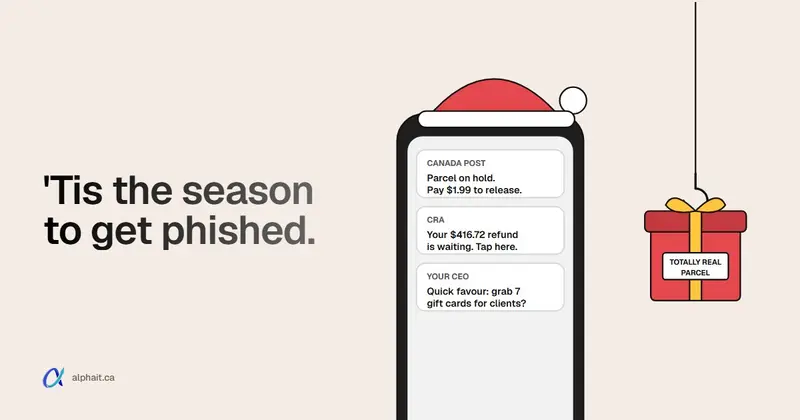
From now until early January, most scams your staff see will look like things they expect in December: a parcel, a tax refund, an Interac e-Transfer, a holiday party invite, or a quick favour from the boss. Four rules stop almost all of them. Canada Post never texts you asking for a delivery payment. The CRA never sends refunds by e-Transfer or text. Nobody at your company should ever ask for gift cards by email. And you check anything urgent on the real website or with a number you already have. Never use the link or number in the message. Below is each scam with realistic wording, the tell, and what to do. At the end there’s a one-screen cheat sheet and an email you can forward to your team.
These work in December because they fit the season. Office managers are ordering gifts. Staff are waiting on refunds. Bosses are away. Scammers only need one person to click before thinking.
Fake Canada Post and Purolator delivery texts
What it looks like:
Canada Post: Your package is on hold due to an incomplete address. Please update your details within 24 hours to avoid return to sender: canadapost-redelivery[.]info
Variations ask for a small “redelivery fee” or “customs duty” of a dollar or two. The small amount is the point: they want your card number, not the $1.99.
The tell: Canada Post says its texts only come from the short codes 272727 or 55555, and only if you signed up for them. It says it will never text you asking for payment for a delivery or tracking. It doesn’t charge to track or release a parcel either. Any link that doesn’t go to canadapost-postescanada.ca is fake. Lookalike spellings (canadapost-ca, canada-post-delivery, a .top or .info ending) are the giveaway.
What to do: don’t tap the link. Open the Canada Post app or type canadapost-postescanada.ca yourself and enter the tracking number from your order. If duties really are owing, it’ll show there. Same habit for Purolator, UPS and FedEx: go to the carrier yourself. Forward the text to 7726.
CRA refund and notice of assessment phishing
What it looks like:
Canada Revenue Agency: After the last annual calculation of your fiscal activity, you are eligible to receive a tax refund of $612.48. Click below to accept your refund by Interac e-Transfer.
Or, aimed at whoever handles the books:
Your notice of assessment has been revised due to errors in your return. Download your updated notice here.
The CRA lists that second one, the “revised notice of assessment” email with a download link, as a current scam, along with fake benefit payments and calls threatening arrest.
The tell: the CRA says it will never send refunds by e-Transfer or text message. It also says it never:
- asks for personal or financial information by email,
- sends texts over WhatsApp or Facebook Messenger,
- asks for payment by gift card or cryptocurrency.
Real CRA emails only tell you there is something new in your CRA account. They don’t include a link asking you to enter details. Official CRA web addresses start with canada.ca or end in cra-arc.gc.ca.
What to do: close the email. Type canada.ca into the browser and sign in to My Account or My Business Account. If there’s a real notice, it’ll be there. For a phone call, hang up and call the CRA back on a number you looked up yourself.
Interac e-Transfer scams
What it looks like:
INTERAC e-Transfer: ACME Supplies Ltd. has sent you $1,245.00 (CAD). Deposit your funds: [Deposit]
The “Deposit” button leads to a fake bank login page.
The tell: you weren’t expecting it, or the deposit page asks you to pick your bank and log in from an email link. Interac’s own advice: be suspicious of any notification you weren’t expecting, and contact the sender to confirm. If you can’t confirm it, forward it to phishing@interac.ca.
What to do: never deposit from the email link. Open your banking app the way you normally do. A real Interac e-Transfer will be waiting there. With Autodeposit, it’s already in the account. If it’s not in your bank, it doesn’t exist.
Fake holiday party invites, e-cards and “updated holiday schedule” emails
These are the ones that work best inside an office, because they look like internal mail.
What it looks like:
Subject: Updated 2026 Holiday Schedule and Year-End Bonus Details Hi team, please review the attached holiday closure dates and confirm your year-end bonus eligibility before Friday. Sign in with your Microsoft 365 account to view.
You’ve received a holiday e-card from Sarah. Open your card.
RSVP: Staff Holiday Party, Dec 12. Please confirm your dietary preferences here.
The link goes to a fake Microsoft 365 sign-in page. Once someone types their password there, the attacker is often in the mailbox within minutes. A lot of bigger frauds start this way, like the direct-deposit changes in our payroll pirate scam post.
The tell: an internal-looking email that asks you to sign in to see a document, especially about bonuses, pay or schedules. Check the sender’s real address, and ask yourself whether HR normally sends “sign in to view” links.
What to do: don’t sign in from the link. Look where your company actually keeps those things (SharePoint, the HR system), or walk over and ask. Already typed a password? Tell IT straight away. They’ll change it and sign out active sessions. Passkeys and other phishing-resistant sign-in make this attack much less useful. See our post on moving from SMS codes to passkeys.
Gift-card requests from “the boss”
What it looks like:
Hi, are you at your desk? I need a quick favour. I’m in meetings all afternoon and want to surprise a few clients for the holidays. Can you pick up 7 Visa gift cards at $200 each? Scratch the backs and send me photos of the codes. I’ll pay you back today. Keep it between us for now.
We didn’t make up “7 Visa gift cards at $200 face value”. It’s the Canadian Anti-Fraud Centre’s own example for its business executive spoof, gift card variation. The CAFC also describes a “head office spoof”. Someone phones a franchise location, claims to be from head office, and asks staff to activate prepaid cards.
The tell: gift cards plus urgency plus secrecy. It may come from a Gmail address with the boss’s display name, or from the real mailbox after a takeover. Either way, the request itself is the red flag.
What to do: the CAFC’s advice is simple. Look up the person’s contact details in your own work directory and check with them directly. Text or call the boss on the number you already have. Owners: tell your staff in writing that you will never ask for gift cards by email or text. It takes 30 seconds and it removes the pressure.
QR-code phishing
What it looks like: a PDF or email “from IT” or “from the parking company” with a QR code instead of a link. It says “Scan to re-validate your account before the holidays” or “Scan to update your parking permit for 2027”. Or a sticker placed over the real QR code on a parking meter or a flyer.
The tell: a QR code is a link you can’t read, scanned on a phone that skips your email filters. Anything that leads to a login page is suspect.
What to do: the Canadian Centre for Cyber Security says inspect a code before you scan it, avoid codes in unsolicited messages, and check the web address closely if it asks you to sign in. For work accounts, the rule is easier: IT will never ask you to sign in through a QR code. Report it.
Charity scams
What it looks like: a December email or call collecting for a name very close to a well-known charity, often pitched to offices as a “corporate sponsorship”.
The tell: pressure to give right now, payment by gift card, crypto or e-Transfer to a personal email, and no registration number.
What to do: before the company gives, look the charity up on the CRA’s List of charities and other qualified donees. Check the exact name and registration number. Then donate through the charity’s own website, typed in yourself.
Fake year-end supplier invoices
Fake invoices and “our banking details have changed” emails also peak at year-end, while everyone clears payables. We cover the call-back rule your bookkeeper should follow in our post on the fake invoice scam.
Want to test your team first? Send them our free Spot the Scam quiz: ten realistic emails and texts, including parcel, CRA and gift card tricks like the ones above.
Staff cheat sheet (print this)
| Message | The tell | Do this instead |
|---|---|---|
| Canada Post / Purolator “package on hold” text | Asks for a fee or address by text; link isn’t the carrier’s real site | Track on the carrier’s own app or site. Forward the text to 7726 |
| CRA refund or “revised notice of assessment” | CRA doesn’t send refunds by e-Transfer or text, or links asking for info | Sign in to your CRA account by typing canada.ca |
| Interac e-Transfer you weren’t expecting | Deposit button opens a bank login from an email | Open your banking app directly. Forward fakes to phishing@interac.ca |
| “Updated holiday schedule”, bonus, party RSVP, e-card | Asks you to sign in to Microsoft 365 to view it | Check SharePoint or ask HR in person. Tell IT if you typed your password |
| Boss asks for gift cards | Urgent, secret, gift cards, “send photos of the codes” | Call the boss on a number you already have |
| QR code in an email or PDF | Leads to a login page | Don’t scan. Report it to IT |
| Charity appeal | Pressure, gift card or crypto payment, no registration number | Check the CRA List of charities |
| Supplier “new bank details” | Change requested by email only | Call the supplier on the number on file |
One rule covers all of them: if a message wants you to act fast, go around it. Use the app, website or phone number you already know.
An email you can forward to your staff
Copy this, change the names, and send it this week.
Subject: Holiday scam season: please read (2 minutes)
Hi everyone,
We’re entering the busiest scam season of the year. Please keep these in mind until January:
- I will never ask you to buy gift cards by email or text. If a message from me or any manager asks for gift cards, a payment or a bank change, call me on my cell.
- Delivery texts: Canada Post doesn’t text for payments. Check tracking on the carrier’s own app or website.
- CRA: the CRA doesn’t send refunds by e-Transfer or text. Sign in to your CRA account directly.
- Interac: don’t deposit from an email link. Open your banking app.
- “Sign in to view” emails about holiday schedules, bonuses or parties: don’t sign in. Check with [HR / office manager name] instead.
- If you clicked or typed your password somewhere, tell [IT contact] right away. You won’t be in trouble. The sooner we know, the less damage there is.
Thanks, and happy holidays. [Your name]
Point six matters most. Staff who fear getting in trouble wait until Monday. By then the attacker has had the whole weekend.
How to report holiday scams in Canada
- Spam texts: forward them to 7726 (it spells SPAM). Get Cyber Safe says it’s free and doesn’t count against your plan. It alerts your carrier so it can investigate and block the sender. On Android, press and hold the message, tap Forward and send it to 7726. On iPhone, press and hold, tap More, then the forward arrow.
- Fraud or attempted fraud: report it to the Canadian Anti-Fraud Centre. Go online to reportcyberandfraud.canada.ca or call 1-888-495-8501 (Monday to Friday, 10 am to 4:45 pm Eastern). Report even if nobody lost money: it helps police link cases.
- Money lost: call your bank first, then your local police. The CAFC doesn’t investigate cases itself.
- Fake Interac notifications: forward to phishing@interac.ca.
- At work: tell your IT provider. If Outlook has a Report or Report phishing button, use it so the message can be pulled from other inboxes.
Did someone type client or patient information into a fake page? That may be a privacy breach you have to report. Our Alberta PIPA breach reporting guide walks through when you have to notify.
What owners can do this week
Filters should catch most of this before anyone sees it. On Microsoft 365, make sure your email security is tuned: impersonation protection for executives’ names, Safe Links, and an external-sender tag. Your domain also needs SPF, DKIM and DMARC set up properly. That’s what stops “your boss” emailing from a lookalike domain.
If you only do one thing this week, send the staff email above. It’s free, and it changes what people do at 4:55 on a Friday.
Sources
- Canada Revenue Agency: Recognize a scam (what the CRA will never do, notice of assessment phishing, Grocery Rebate and benefit scams)
- Canada Post: Recognizing spam, fraudulent emails and text messages (short codes 272727 and 55555, no payment requests by text, 7726)
- Interac: What is email fraud, phishing or spearphishing, SEO poisoning, or SMS phishing? (unexpected notifications, phishing@interac.ca)
- Canadian Anti-Fraud Centre: Spear phishing (business executive spoof gift card variation, head office spoof, payroll spoof, supplier swindle)
- Canadian Anti-Fraud Centre: Reporting fraud
- Get Cyber Safe: Reporting spam text messages to 7726
- Canadian Centre for Cyber Security: Security considerations for QR codes (ITSAP.00.141)
- CRA: Search tips for the List of charities
Frequently asked questions
Does Canada Post send text messages about deliveries?
Only if you signed up for notifications, and then only from the short codes 272727 or 55555. Canada Post says it never texts you asking for payment for a delivery or for tracking. It doesn’t charge to track or release a parcel. Check any fees by entering your tracking number on canadapost-postescanada.ca or in the Canada Post app.
Does the CRA send tax refunds by Interac e-Transfer?
No. The CRA says it never sends refunds or payments by e-Transfer or text message. Refunds come by direct deposit or cheque. Any email or text offering a CRA refund through an e-Transfer link is a scam.
How do I report a scam text message in Canada?
Forward it to 7726, which spells SPAM. It’s free and alerts your carrier so it can block the sender. Lost money or shared personal information? Also call your bank and report it to the Canadian Anti-Fraud Centre at 1-888-495-8501 or reportcyberandfraud.canada.ca.
What should an employee do if they clicked a phishing link at work?
Tell IT immediately, even if nothing seemed to happen. If they typed a password, change it and sign out all active sessions. Attackers can get into a mailbox within minutes. Companies should make it clear that reporting a click quickly won’t get anyone in trouble.
Want fewer of these reaching your staff in the first place? AlphaIT’s email security and cybersecurity services tune Microsoft 365 filtering and impersonation protection for Edmonton offices. Contact us.