Vishal Sharma
On this page
- What does the Outlook flaw actually do?
- Which Outlook versions are affected?
- How to check and update Outlook on each PC
- What should you do while PCs catch up?
- The Windows side: NTLM signing starts now
- Why wouldn’t KB5132061 install?
- What else did November fix?
- A 10-minute patch checklist for this week
- Sources
- Frequently asked questions
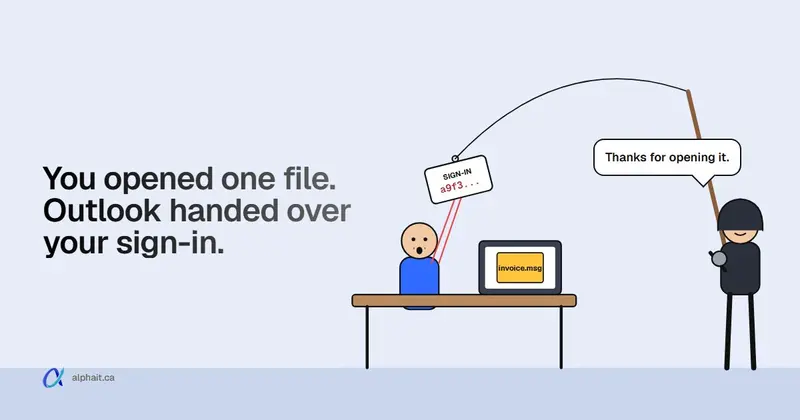
Microsoft’s November 10, 2026 updates fix an Outlook flaw that attackers are already using. It’s CVE-2026-124194. If someone opens a booby-trapped message file, classic Outlook connects to a server the attacker controls. It does this without the usual external-content warning. Along the way it hands over the user’s NTLMv2 password hash. Microsoft rates it only Moderate (CVSS 6.5), but it’s marked “Exploitation Detected”. CISA added it to its Known Exploited Vulnerabilities list on November 10, with a November 24 deadline for US federal agencies. The fix is in this month’s Microsoft 365 Apps and Office LTSC 2021/2024 updates. The same week, the Windows update KB5132061 failed to install on some PCs. Microsoft has since repaired that automatically. This post covers both, and how to check each PC in about two minutes.
Don’t let the “Moderate” label slow you down. A low score with active attacks beats a high score nobody is using. If you only patch one thing this week, patch Outlook.
What does the Outlook flaw actually do?
Here’s what Microsoft’s advisory says, in plain terms.
- An attacker sends a specially crafted message file. No login or prior access needed.
- The user opens it. Microsoft says the Preview Pane is not an attack vector. Clicking once to preview is not enough. Opening is.
- Outlook reaches out to an attacker-controlled network location. Normally Outlook warns before loading external content. Here, it doesn’t.
- Windows tries to sign in to that location automatically and sends the user’s NTLMv2 hash.
What can the attacker do with a hash? Microsoft says it can be used to authenticate as that user. In practice that means one of two things. They try to crack it offline to recover the password. Or they relay it to another server on your network that still accepts NTLM.
Microsoft hasn’t published indicators of compromise, and it doesn’t say who’s using the flaw. Be wary of articles that claim to know.
Which Outlook versions are affected?
The Security Update Guide entry lists:
- Microsoft 365 Apps for Enterprise (32-bit and 64-bit). This is the desktop Office most Microsoft 365 business plans install.
- Office LTSC 2024, fixed in build 16.0.17932.21140
- Office LTSC 2021, fixed in build 16.0.14334.21048
The new Outlook for Windows and Outlook on the web aren’t on the list. The risk sits with classic desktop Outlook.
Here are the November 10 builds from Microsoft’s Office security update notes. Your PC should show this build or a later one:
| Update channel | Version | Build (or later) |
|---|---|---|
| Current Channel | 2610 | 20527.20196 |
| Monthly Enterprise Channel | 2610 / 2609 / 2608 | 20527.20194 / 20430.20264 / 20326.20320 |
| Semi-Annual Enterprise Channel | 2610 / 2609 / 2608 | 20527.20192 / 20430.20262 / 20326.20318 |
| Office 2024 and 2021 retail | 2610 | 20527.20196 |
| Office LTSC 2024 (volume) | 2408 | 17932.21140 |
| Office LTSC 2021 (volume) | 2108 | 14334.21048 |
Most small offices are on Current Channel. If you’ve never touched update channels, that’s probably you.
How to check and update Outlook on each PC
Office updates itself in the background, but only when Outlook gets closed now and then. Lots of people never close it. Do this on every PC:
- Open Outlook. Go to File › Office Account.
- Look under About Outlook for the version and build, like “Version 2610 (Build 20527.20196 Click-to-Run)”.
- If it’s older than the table above, click Update Options › Update Now.
- Close Outlook when it asks. Let the update finish, then reopen and check the build again.
On a managed fleet, check your device management tool’s Office version report instead of walking desk to desk. Without one, a sticky note on each monitor that says “File › Office Account › Update Now” works better than you’d think.
What should you do while PCs catch up?
Tell staff one thing today: don’t open message files or attachments you weren’t expecting, even from a known name. Forward anything odd to whoever handles IT. The attack needs someone to open a file, so a 30-second warning actually helps.
Then look at the hash side. Microsoft doesn’t list a workaround for this CVE. But for a similar Outlook hash-leak flaw in 2023 (CVE-2023-23397), Microsoft’s advisory gave two mitigations that still apply:
- Block outbound TCP 445 (SMB) at your firewall and on VPN. Microsoft says this stops NTLM messages from reaching file shares on the internet. Hardly any office needs to reach an outside file server over port 445. This is the one I’d do. Ask whoever manages your firewall, or see our firewall and network security page.
- Add sensitive accounts to the Protected Users group in on-premises Active Directory. This stops those accounts from using NTLM at all. It can break older apps that rely on NTLM, so test with one account first. If you’re cloud-only with no server, this one doesn’t apply.
And if a hash does get cracked, MFA on Microsoft 365 stops the password from being enough to get into email. Still have staff without it? Our guide to setting up MFA in Microsoft 365 walks through it.
The Windows side: NTLM signing starts now
This month’s Windows update also includes a related change. According to Microsoft’s NTLM signing article (KB5135557), Windows PCs now offer NTLM message signing by default. That makes stolen NTLM sign-ins harder to relay.
- Now (phase 1, November 10, 2026): PCs offer signing. Servers still accept unsigned connections and log the ones that skip it.
- May 2027 (phase 2): Windows servers start requiring signing by default and reject clients that don’t offer it.
For an office with a Windows server, this is a heads-up for spring. Old copiers, scan-to-folder setups and NAS boxes that use NTLM may be the ones that break. Microsoft says to review Event ID 4023 in the Microsoft-Windows-NTLM/Operational log on servers. It needs Windows Server 2019 or later with enhanced NTLM auditing. Turn on the registry value ServerRequireNtlmSign only when that log shows no unsigned connections. If nobody reads your server logs, put it on the list for early 2027.
Why wouldn’t KB5132061 install?
KB5132061 is the November Windows 11 security update. It brings PCs to build 26200.9974 (25H2), 26300.9974 (26H2) or 26100.9974 (24H2 Enterprise and Education). Some PCs got stuck. They either kept trying to install it or showed error 0x80070306, 0x800f0989 or 0x800f0993.
Microsoft ties the problem to devices that had installed the optional October preview, KB5127936. PCs that skipped the preview weren’t affected. (We covered what that preview added in our November Microsoft 365 and Windows changes roundup.)
Microsoft’s fix needed no action from you. Starting November 11, 2026 at 10am PT, a repair rolled out through Windows Update to internet-connected PCs. Microsoft said affected devices should be fixed within 24 to 48 hours of hitting the error. After that, the update installs on its own. On November 16, Microsoft marked the issue resolved.
One oddity: Microsoft’s own KB page has typos about this issue. In one place it calls KB5127936 the November update. Its “applies to” line only names 24H2 Enterprise and Education. Treat any Windows 11 PC that took the October preview as possibly affected.
What should your office do now?
- Check the build on each PC. Press Windows key + R, type
winverand press Enter. Or go to Settings › System › About. If the build ends in .9974 or higher, the PC is done. - Not there yet? Retry. Go to Settings › Windows Update and click Check for updates. Restart when asked. Leave the PC on and online for a while, since the repair arrives on its own.
- Still failing a day or so later? Check Settings › Windows Update › Update history to see if KB5132061 lists as failed and which error it shows. Microsoft’s support page also offers a manual install from the Microsoft Update Catalog. That route needs the prerequisite and checkpoint updates installed in order, so I’d leave it to your IT person.
- Still stuck after that? Microsoft says to contact Microsoft Support. If you have an IT provider, hand it to them.
What I wouldn’t do: pause updates for the month “until things settle”. That leaves the PC open to everything else on this list.
One more check while you’re in Settings › System › About. If the PC is Windows 11 Pro on 24H2, it didn’t get KB5132061 at all. 24H2 Home and Pro stopped getting security updates in October. Our post on Windows 11 24H2 end of support explains how to move it to 25H2 or 26H2.
What else did November fix?
Reports don’t agree on the total number of fixes this month. Counts run from about 1,090 to over 1,200, depending on what each outlet counts. The number doesn’t matter much. These do:
| Fix | What it is | Who should care |
|---|---|---|
| CVE-2026-119958 | Windows LDAP remote code execution, Critical, CVSS 9.8. No login needed. | Anyone with a Windows domain controller. Patch it first. |
| CVE-2026-116928 | Windows Search remote code execution, Critical, CVSS 9.8. Exchange indexes a crafted attachment, so nobody has to open it. | Offices running their own Exchange server |
| CVE-2026-118207 | Exchange Server remote code execution, Critical, CVSS 8.8. Needs low-level access first. | On-premises Exchange |
| CVE-2026-118146 | Active Directory Domain Services remote code execution, Critical, CVSS 8.8. Needs low-level access first. | Domain controllers |
| CVE-2026-111289, CVE-2026-120003 | Microsoft Office remote code execution, Critical, CVSS 8.8. The Preview Pane is an attack vector. | Every PC with Office. Same Office update as the Outlook fix. |
Microsoft hasn’t marked any of these as exploited. Still, the LDAP and Windows Search bugs are the scary kind: no password and no click. If you have a server in a closet, it gets patched this week, not next month. Most small offices on Microsoft 365 with no server only need the Windows and Office updates above. Edge devices like firewalls and email gateways had their own exploited bugs this month. That’s covered in our CISA edge-device checklist.
Chrome and Edge: on November 9, Google patched CVE-2026-125350, a high-severity bug in Chrome’s XML component. Google said an exploit “exists in the wild”. Microsoft’s Edge security notes list the fix in Edge 157.0.4341.46, also released November 9. Browsers update on their own, but only after a restart. Have everyone go to Help › About in Chrome or Edge (Settings › About Microsoft Edge) and click Relaunch.
Also, not to be confused with this patch: the November 12 Microsoft 365 outage was a separate service problem on Microsoft’s side, not a security flaw. Our November 12 outage post covers what happened.
A 10-minute patch checklist for this week
- Every PC: Outlook build matches the table above (File › Office Account)
- Every PC: Windows build ends in .9974 or later (
winver) - No Windows 11 Pro PCs left on 24H2
- Chrome and Edge relaunched
- Domain controllers and any Exchange server patched and restarted
- Outbound TCP 445 blocked at the firewall
- Staff told: don’t open unexpected message files or attachments
- Everyone on Microsoft 365 has MFA
Keeping this list ticked every month, without someone chasing it, is the core of managed IT support. If a staff member already opened something suspicious, follow our phishing emergency steps and reset their password.
Sources
- Microsoft Security Update Guide: CVE-2026-124194, Microsoft Office Outlook Spoofing Vulnerability (severity, CVSS, exploited status, Preview Pane FAQ, affected products and LTSC builds)
- CISA Known Exploited Vulnerabilities Catalog (CVE-2026-124194 added November 10, due November 24, 2026)
- Microsoft Learn: Release notes for Microsoft 365 Apps security updates (November 10, 2026 builds per channel)
- Microsoft Support: KB5132061, November 10, 2026 Windows 11 update (builds, install failure known issue, automatic repair, resolution on November 16)
- Microsoft Support: NTLM signing security improvements in Windows (KB5135557) (phase dates, Event ID 4023, ServerRequireNtlmSign)
- Microsoft Security Update Guide: CVE-2023-23397 (Protected Users and outbound TCP 445 mitigations)
- Microsoft Security Update Guide: CVE-2026-119958, CVE-2026-116928, CVE-2026-118207, CVE-2026-118146, CVE-2026-111289, CVE-2026-120003
- Microsoft Learn: Microsoft Edge security release notes (Edge 157.0.4341.46, CVE-2026-125350)
- BleepingComputer: Microsoft confirms KB5132061 installation issues
- The Hacker News: Google issues Chrome security update (CVE-2026-125350, exploited in the wild)
- CSO Online: November 2026 Patch Tuesday (patch priorities)
Frequently asked questions
What is CVE-2026-124194?
It’s a spoofing flaw in classic desktop Outlook, patched on November 10, 2026. If a user opens a crafted message file, Outlook connects to an attacker’s server without showing the external-content warning. That leaks the user’s NTLMv2 password hash. Microsoft says it’s being exploited, and CISA added it to its Known Exploited Vulnerabilities list the same day.
Can the Outlook zero-day trigger from the Preview Pane?
No. Microsoft’s advisory says the Preview Pane is not an attack vector for CVE-2026-124194. The user has to open the file. Two Critical Office flaws fixed the same day (CVE-2026-111289 and CVE-2026-120003) can trigger from the Preview Pane, so install the Office update either way.
How do I know if Outlook is patched?
In Outlook, go to File, then Office Account, and read the build under About Outlook. On Current Channel, you need Version 2610 build 20527.20196 or later. Office LTSC 2024 needs 16.0.17932.21140 and LTSC 2021 needs 16.0.14334.21048. If you’re behind, click Update Options, then Update Now.
How do I fix KB5132061 error 0x800f0993, 0x80070306 or 0x800f0989?
Microsoft pushed an automatic repair through Windows Update starting November 11, 2026, and marked the issue resolved on November 16. Leave the PC online, then go to Settings, Windows Update, Check for updates, and restart. Run winver to confirm the build ends in .9974 or later. If it still fails, Microsoft offers a manual install from the Update Catalog or Microsoft Support.
Is the November 12 Outlook outage related to this zero-day?
No. The November 12 outage was a Microsoft 365 service problem on Microsoft’s side. CVE-2026-124194 is a security flaw in the Outlook app on your PC that you fix by updating Office.
Want someone to confirm every PC and server in your office got November’s fixes, and keep it that way each month? AlphaIT’s cybersecurity team can check builds, block outbound SMB and set up MFA for you. Contact us.